
AskAI - Generative AI for Smarter Audit Analysis
Overview of AskAI
AskAI is integrated into the Annual Audit Assignment landing page, specifically within the Load Audit Program section. By clicking the AskAI button, users can interact with multiple AI models to analyze client data and obtain insights.

Key Advantages of AskAI
AskAI provides several advantages over using standalone AI tools:
1. Direct Access to Audit Data
Users do not need to manually compile data from multiple spreadsheets. All uploaded audit data can be attached directly as context.
2. Built-In Data Masking
Sensitive information is automatically masked before being sent to AI models and restored after processing.
3. Multi-Model Comparison
Users can compare responses from multiple AI models in a single interface.
4. Transparent Cost Tracking
Detailed insights into token usage, response time, and cost help users manage AI usage efficiently.
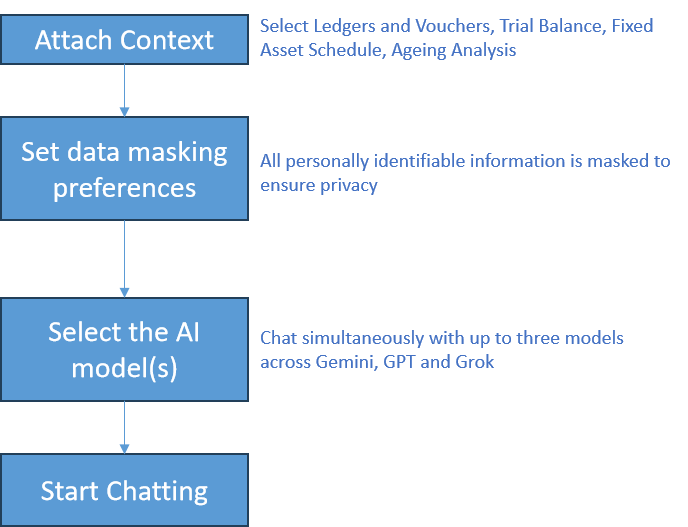
The system currently supports six AI models, and users can simultaneously interact with up to three models for comparison and validation.
The interaction process is straightforward:
- Attach relevant audit data as context
- Ask questions in natural language
- Review AI-generated insights and responses
This enables auditors to perform complex analysis without manually compiling data from multiple sources.
1. Using Context-Based Queries
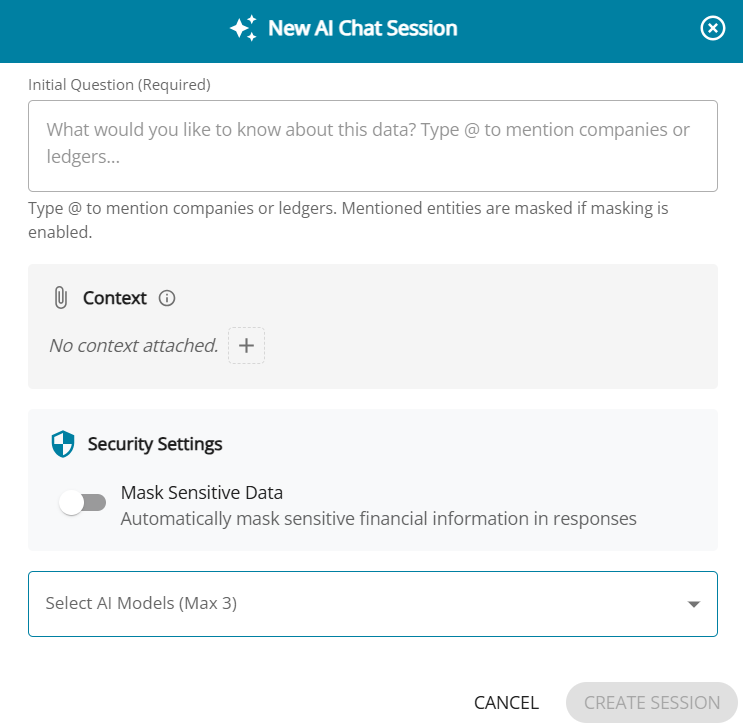
One of the most powerful capabilities of AskAI is the ability to attach audit data as context before asking a question.
The platform allows users to attach various datasets available within the audit engagement, including:
- Fixed Asset Schedules
- Aging Analysis
- Trial Balance (4-column format)
- Ledgers and Voucher Transactions
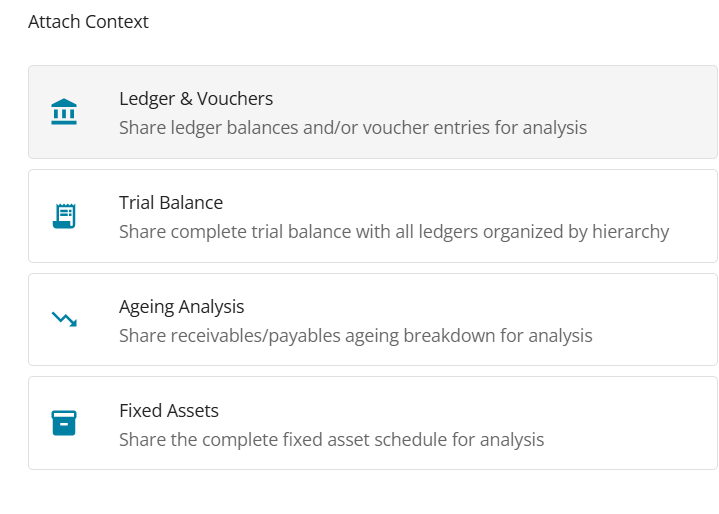
Users can further filter specific ledgers or transactions to focus the analysis. For example, an auditor investigating related party transactions can select only the relevant ledgers before submitting a query.
Additional options allow users to:
- Include voucher entries
- Include previous year data
- Exclude narrations to reduce data volume and optimize cost
After attaching the context, users can ask questions just as they would in common AI chat tools.
Example query:
“Analyze the related party ledgers and prepare the reporting required under Clause 48(2)(b) of Form 3CD.”
The system then sends the context and query to the selected AI model and returns the response.
2. Credit-Based Usage
AskAI is a paid feature, and usage operates on a credit-based system.
To help users explore the feature, preloaded credits have been provided. Each query consumes credits based on:
- Number of input tokens
- Number of output tokens
- Processing time
For every AI response, the system displays detailed usage information including:
- Credits consumed
- Number of tokens used
- Response time
- Estimated cost
This transparency helps users optimize their queries and manage usage efficiently.
3. GenAI Settings and Model Management
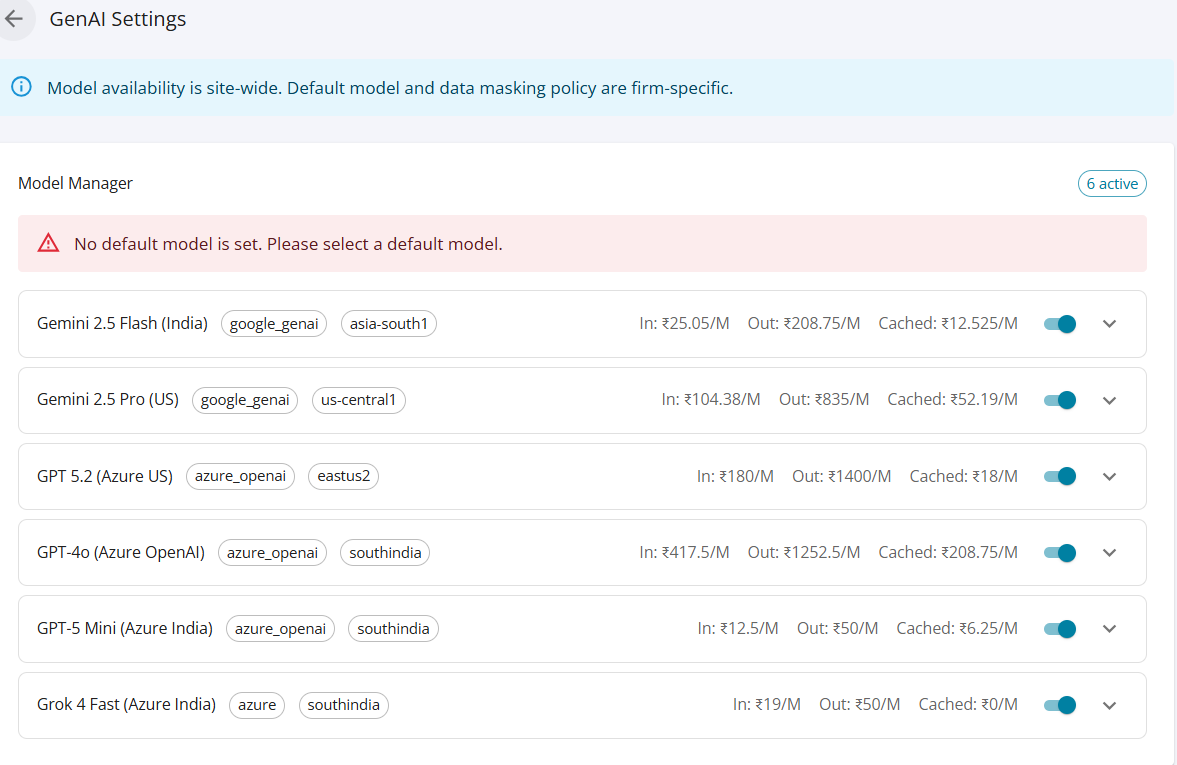
The GenAI Settings panel is accessible only to Auditors and Administrators and allows firms to configure their AI usage policies.
Available settings include:
Model Selection
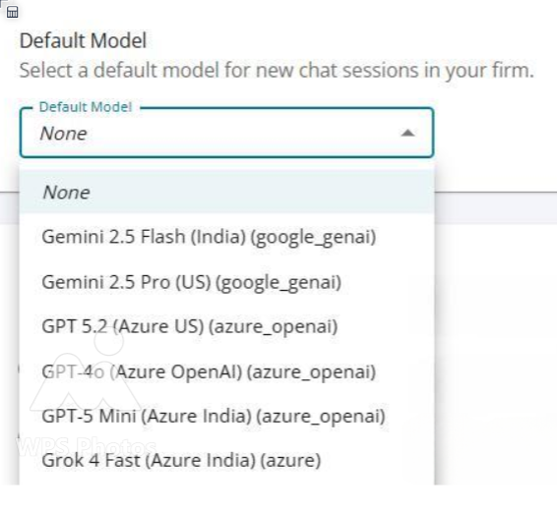
The platform currently supports six AI models. Administrators can:
- Enable or disable specific models
- Select a default preferred model
- View deployment location of each model
- Compare usage cost per million tokens
This flexibility allows firms to align model usage with their data residency preferences and cost considerations.
4. Data Masking for Sensitive Information
Data security is a critical aspect of AI usage in audit environments. AskAI includes a built-in data masking capability to protect sensitive information.
The system automatically detects and masks personally identifiable information such as:
- Vendor names
- Supplier names
- PAN numbers
- GSTIN
- Other sensitive identifiers
Administrators can configure the data masking policy to:
- Always mask sensitive information
- Enable masking by default with user override
- Allow user-level control
When masking is applied, the system replaces sensitive values with placeholders before sending the data to the AI model. Once the response is received, the system automatically unmasks the information, restoring the original values in the output.
The platform also provides full transparency by displaying:
- The number of items masked
- The original value
- The masked replacement used during processing
Users can also manually mask additional fields if required.

5. Multi-Model Comparison
AskAI allows users to send the same query to multiple AI models simultaneously and compare the responses.
This helps auditors evaluate:
- Accuracy
- Completeness
- Analytical depth
- Differences in interpretation
The platform also provides a response comparison feature, where a third AI model analyzes the outputs from two models and highlights:
- Key agreements
- Key differences
- Contradictions
- Recommendations
This capability helps professionals validate insights before relying on them in audit analysis.
6. Conversation Management
AskAI provides a familiar conversational interface similar to modern AI tools.
Key features include:
- Continuous follow-up questions within the same conversation
- Multiple chat sessions per client assignment
- Ability to rename chats for easier reference
- Table of contents navigation to jump to specific parts of a conversation
All chats related to a specific client engagement are stored and accessible from the interface.