
AssureAI - Release Note - Annual Audit (Preaudit) Enhancements Phase 2 - August 2025
We’re excited to share key updates this audit season. Read on to know what's new:
1. Preference Share Capital: Capture Preference Share Capital directly from the client onboarding screen
2. Financial Statements:
- Rounding off enabled to the nearest rupee (no decimals).
- Enhanced rounding adjustment logic across all sections.
- Generate 3CD attachments (BS & PL) from Export Financials.
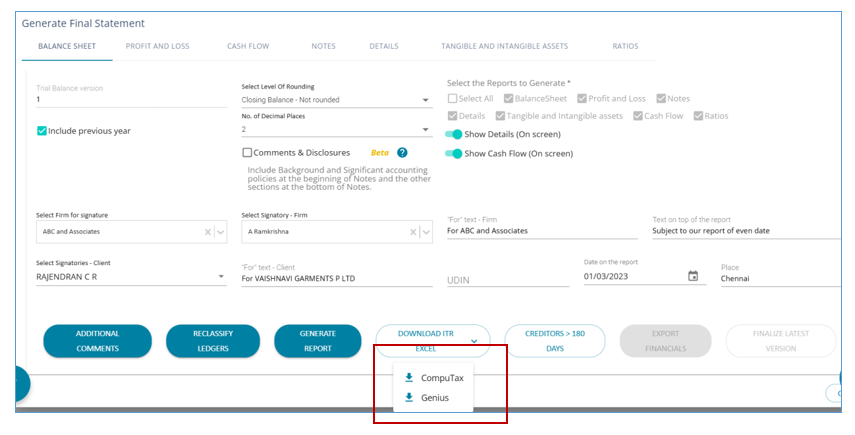
3. ITR Excel: Now available in Computax format, in addition to Genius.
4. Subhead Configuration:
- New upgraded interface with add/edit options.
- Movement Capture of values under each subhead.
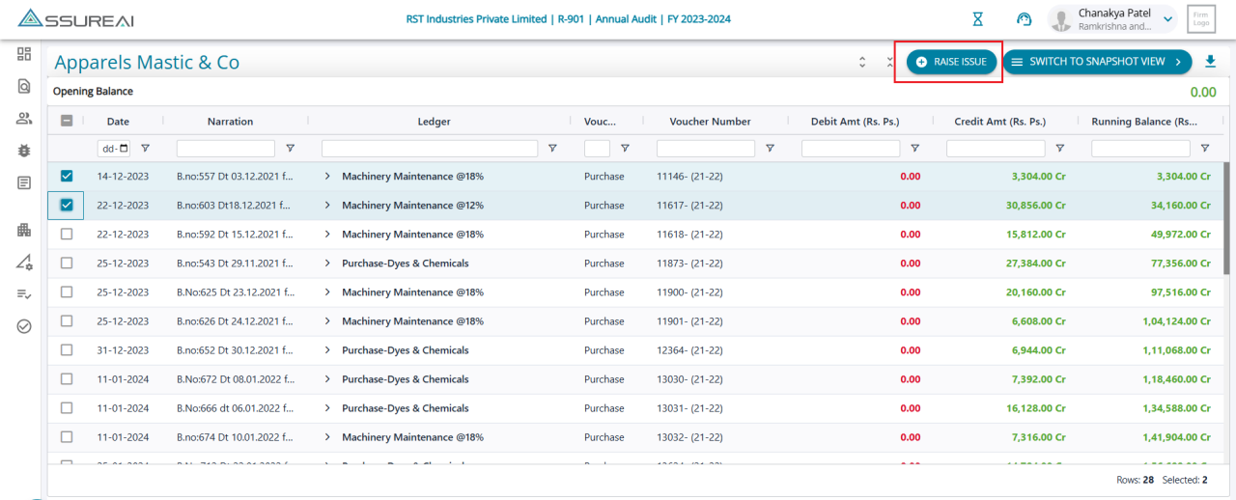
5. Issues Module: Raise issues from the FSLI Testing ledger level screen and ledger view screen.
6. Audit Documentation:
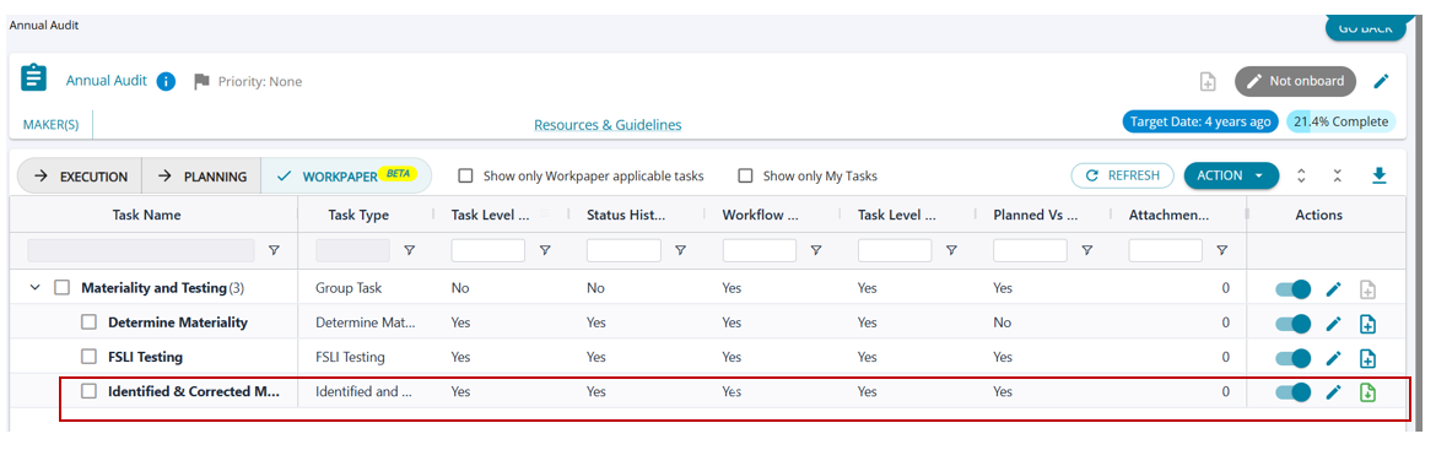
- Workpaper for identified & corrected misstatements.
- Templates for AS21 Checklist and Minutes of Audit Strategy.
7. Improvements & Fixes: General refinements for a smoother experience.
Thank you for being part of the AssureAI journey!
------------------------------------------------------------------------------------------------------------------------------------------------------------------
1. Preference Share Capital
Add preference share capital details to the Financial Statements.

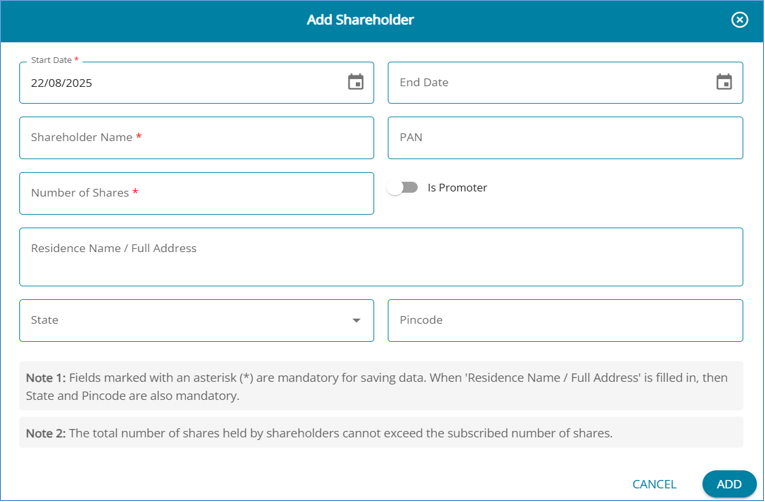
1. New button to add preference share details from “Edit Client”
2. Enter or update details related to Preference share capital and Preference shareholders.
3. Multiple types of Preference shares can be created, with specific details maintained for each type – Share Capital and Shareholders
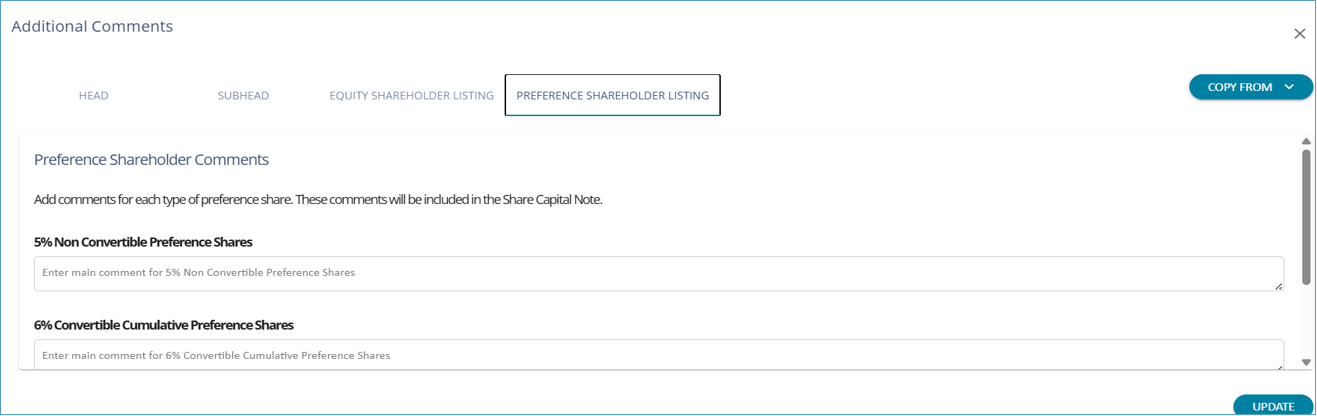
4. Enter Additional comments for each Preference Share type, to be included in the Financials
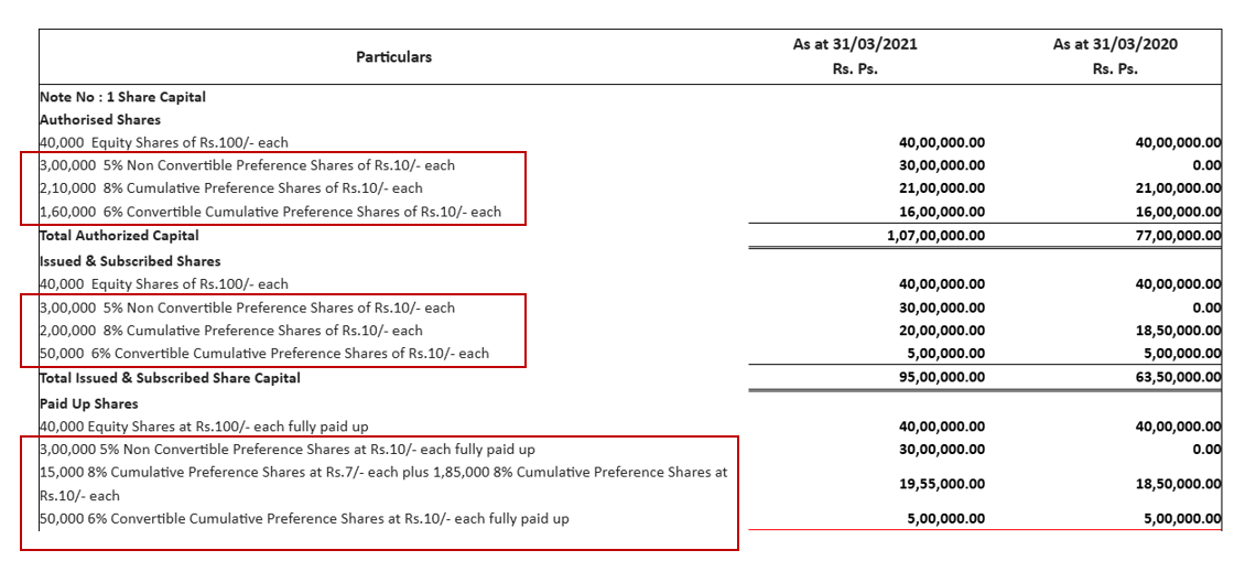
5. Preview of the Notes section in AssureAI's financial statement listing all types of Preference Shares.
2. Rounding Off in Financial Statements
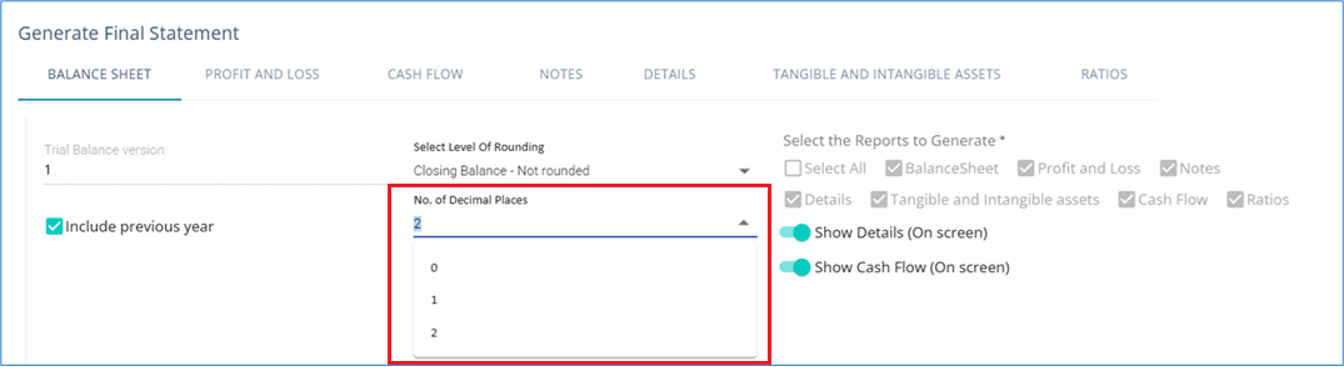
Rupee rounding / Rounding with no decimal places has been added. A new field to choose the number of decimal points has been included. In addition, the rounding logic has been refined and adjustments applied to complex notes like :
- Fixed asset / Intangible assets,
- Ageing Analysis
- Owners' Funds
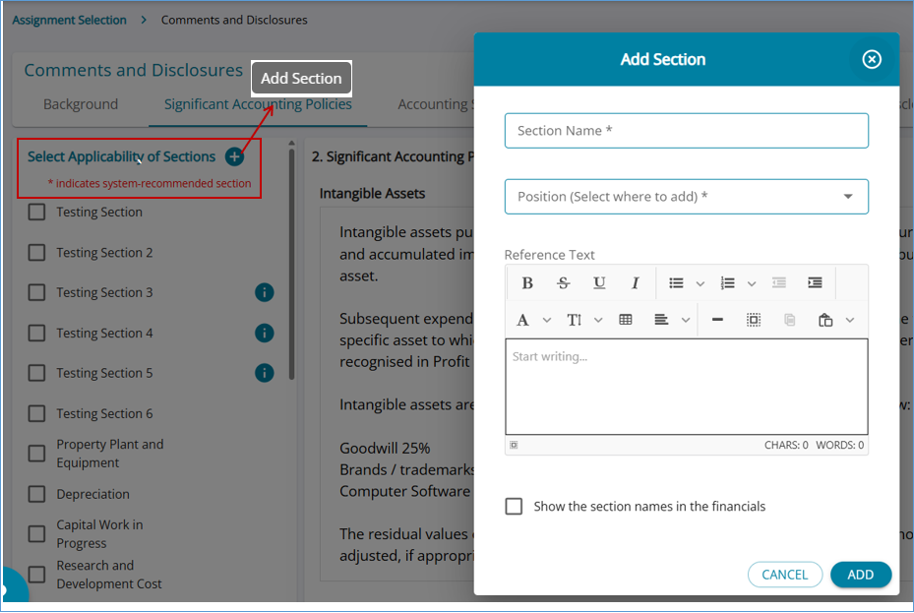
3. Add Sections and Templates to Comments and Disclosures
In addition to the existing sections under the Comments & Disclosures, users can now configure their own sections and templates to be included in the Financial Statement.
4. Generate 3CD attachments (BS and PL) from the Export Financials Page
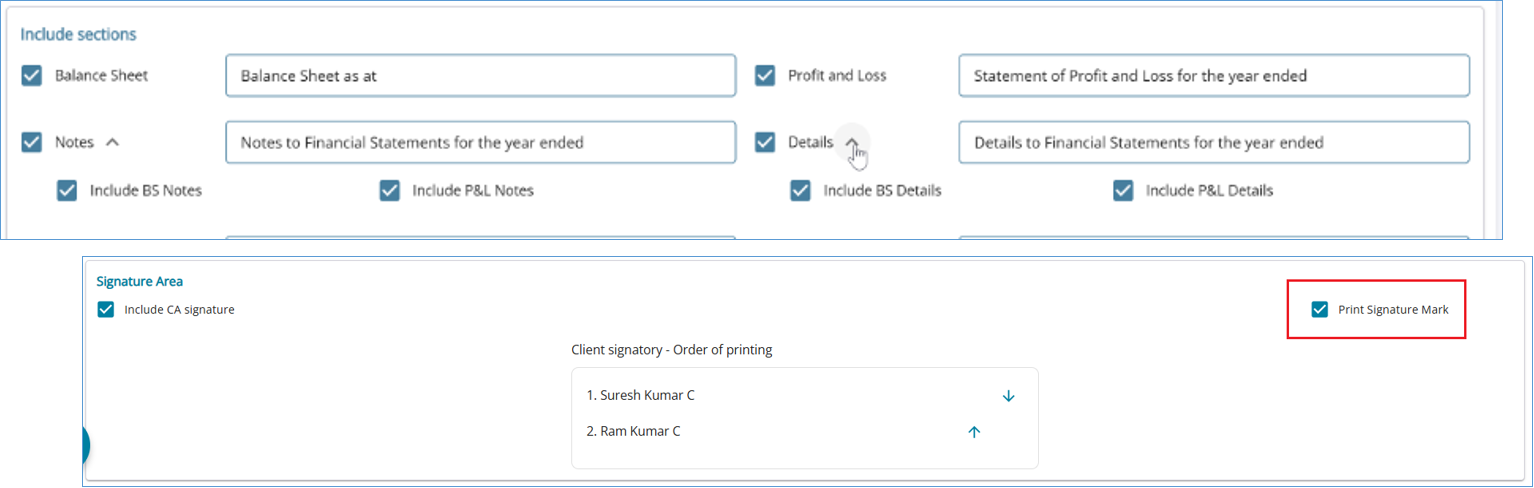
The following changes have been included in the export financials page :
- When "Notes" is selected, the user is allowed to select "Balance Sheet Notes", "P&L Notes"
- When "Details" is selected, the user is allowed to select "Balance Sheet Details", "P&L Details"
- In the signature area, the user is allowed to specify whether the space should be left empty for a signature or a "Sd/" placeholder should be added
5. Subhead Configuration
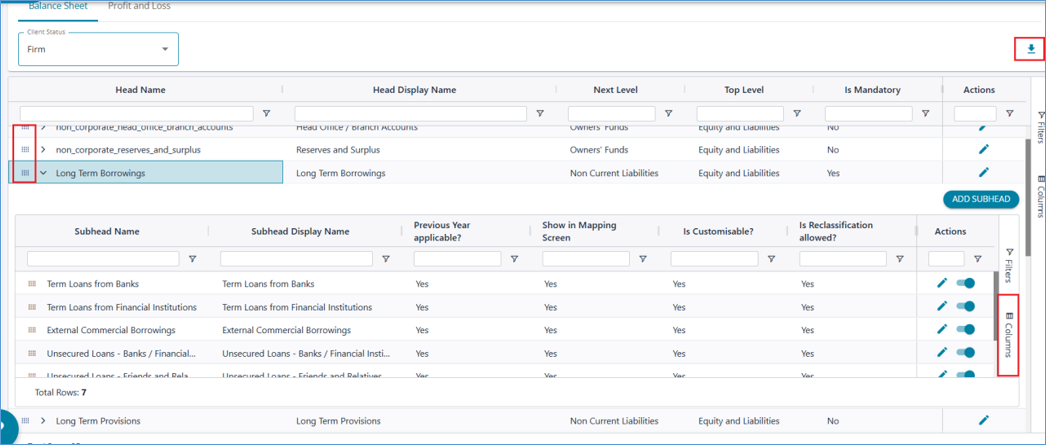
Subhead Configuration page has been redesigned, with additional features, to give more flexibility to the user and reduce the dependency on the Support team.
- Mark a head as Mandatory for display in Financials
- Drag and drop feature to change the position of heads and subheads
- Multiple columns that are hidden by default to understand more information on the subheads
- Download Chart of Accounts
5.1 Subhead Configuration - Edit Subhead / Movement Capture
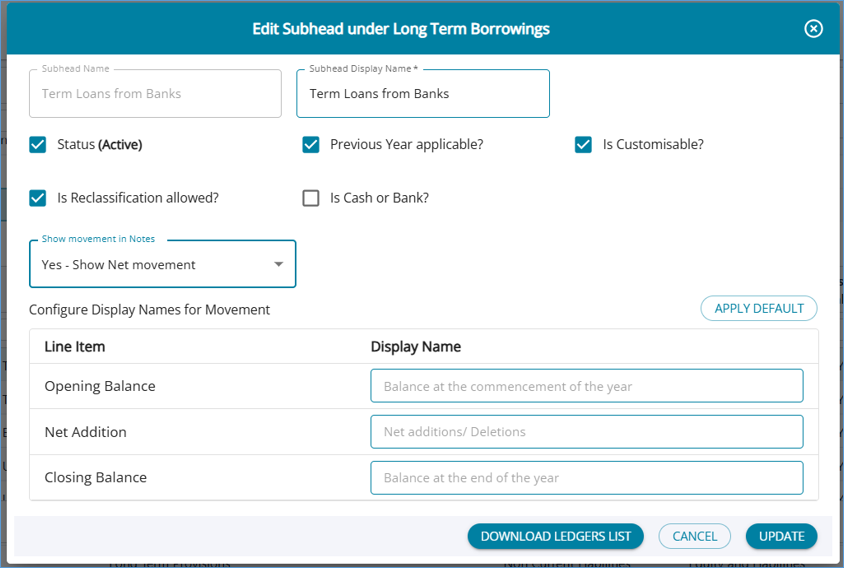
- Enable/disable reclassification for a subhead
- Mark a subhead as cash/bank for consideration in the 3CD cash condition
- Get the list of ledgers mapped under a subhead (For decision-making on deactivation, for example)
- Configure the Movement capture format for subheads. There are 2 options to select from:
- Show Net Movement
- Show gross Movement
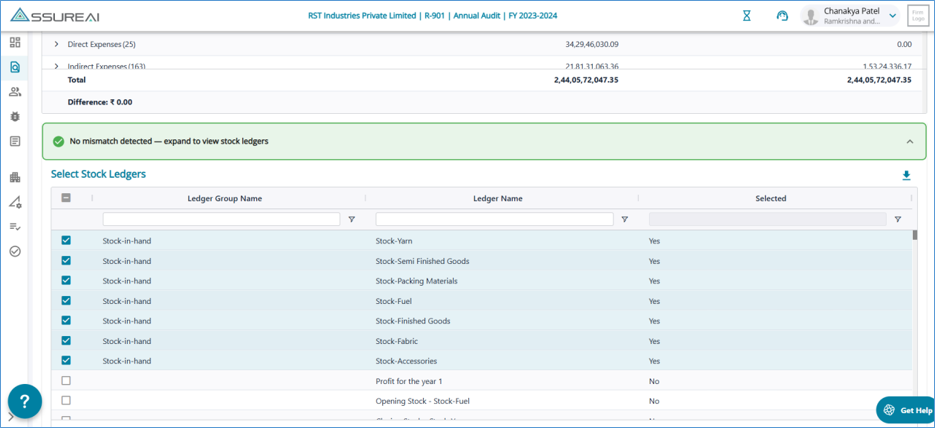
6. Data Validation - Enhancements
- Automatic flagging of Stock ledgers for Excel Trial Balance / Books of Accounts clients
- Selection of Stock ledgers made more user-friendly with a filter and bulk select option
- Excel Export – Simple and Tree structure formats
- False Trial balance mismatch shown in the following cases has been corrected
- Excel Trial Balance import for two consecutive years
- Switching between Tally JSON / Zoho and Excel from one year to the next
- Adding a ledger without a parent group and passing a voucher against it
7. Raise Issues - Enhancements
The Raise Issues module has been enhanced for a better user experience, and now users can raise issues additionally from the following screens.
- FSLI Testing - Ledger Level
- Ledger View
8. ITR Excel for Computax (Beta)
ITR Excel generation in the COMPUTAX format has been enabled
Users are requested to reach out to the Support team to get the mappings between ITR subheads and AssureAI subheads to utilize this functionality.
9. Workpaper for Identified and Corrected Misstatement Task
Users can now generate a workpaper for the Identified and Corrected Misstatement task.
10. Bug Fixes
1. Workpaper ZIP file: Attachments in the zip file will now be placed within subfolders created with the name of the attachment, under which the files will be stored (in the workpaper zip file)
2. Financial Statement details: Ledger Names Sentence Case logic has been refined.
3. Comments and Disclosures
- Alignment format was getting lost in Statement PDF – Fixed
- Ability to resize tables/columns within a table - Added
4. Task Management
- Edit Assignment rules made consistent between Bulk update and Single assignment edit
- Errors in adding a user under a new role after an assignment was started – Fixed
- Assignment Dashboard: “Unassigned” user filter behavior has been corrected
- Ability for Maker to change the assignment status added
*****