
Configure Task Packs
Task Packs: Smarter, Faster Assignment Planning
Assignment planning is a critical step in ensuring the quality and consistency of work. However, it often involves manually selecting relevant tasks from a large pool, which can be both time-consuming and prone to inconsistencies.
To address this challenge, the introduction of Task Packs brings a structured and efficient approach to planning. Task Packs enable the use of pre-configured, reusable sets of tasks tailored to different client types and assignment needs, reducing manual effort while improving standardization.
1. Configure Task Packs
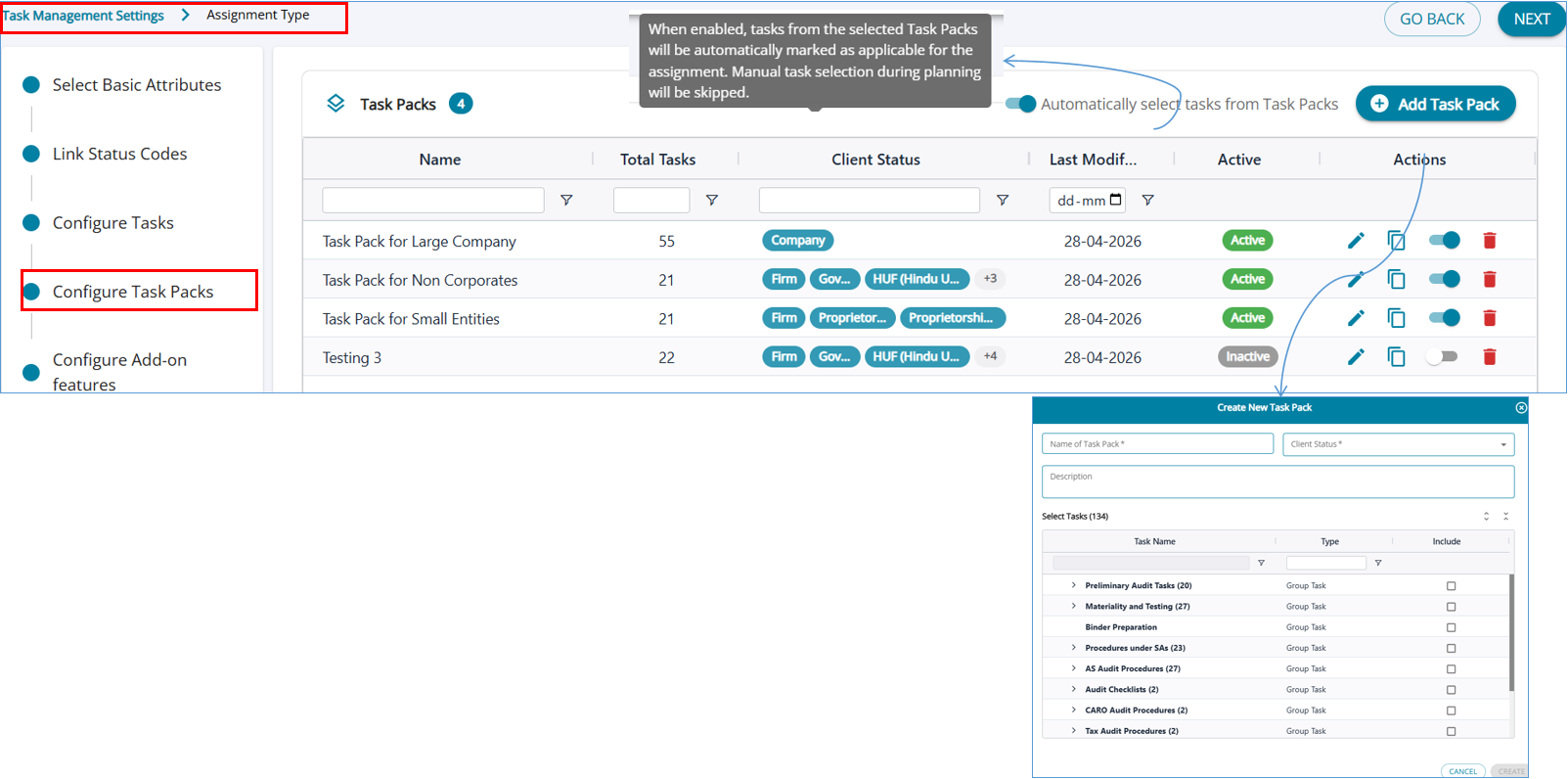
Task Packs are managed within the Task Management Settings → Assignment Type → Configure Task Packs section of the application.
This centralized interface allows administrators to:
(i) View all existing Task Packs
(ii) Create new Task Packs
(iii) Edit or deactivate existing ones
(iv) Control applicability and usage
The layout presents a structured list of Task Packs with key attributes such as:
(i) Name of the Task Pack
(ii) Total number of tasks included
(iii) Applicable client types (e.g., Company, Firm, HUF, etc.)
(iv) Last modified date
(v) Active/Inactive status
(vi) Action Column - Edit , Clone , Activate/ deactivate , Delete

2. Add Task Pack
The creation of a Task Pack is facilitated through a dedicated interface titled “Add Task Pack.”
Within this pop-up, users are required to define:
(i) Task Pack Name: A clear identifier for the task set
(ii) Client Status: Determines which client types the pack applies to
(iii) Description: Optional context for better understanding and governance
(iv) The core of the configuration lies in the task selection grid, where tasks are organized hierarchically (e.g., Preliminary Audit Tasks, Materiality and Testing, Audit Procedures, etc.).
Users can:
(i) Expand task groups to see the entire list of tasks configured for the assignment type
(ii) Select relevant tasks using checkboxes
(iii) Include only those tasks that are applicable to the intended workflow
3. Automatically select tasks from Task Packs
For standardized workflows, Task Packs offer an option to automatically mark tasks as applicable. This enables planners to bypass manual selection and proceed directly to execution, further reducing effort in routine scenarios.
4. User Roles and Interaction
(i) Administrators and Auditors are responsible for configuring and maintaining Task Packs
(ii) Planners (Checkers / Approvers / EQCR) utilize Task Packs during assignment setup
(iii) Execution teams focus only on applicable tasks, benefiting from a cleaner and more relevant task list