
AssureAI Release – August 2026
On the features front, a brand-new Timesheet Reports suite turns raw hours into real insight — utilization, effort, deadlines — while the rebuilt Doc Request Dashboard puts every outstanding client request, and how long it's been sitting there (ageing), in one place.
Trusts get their own NPO-friendly statement format, LLPs can now record their LLPIN, moving between periods is as easy as a click with new navigation arrows, and the P&L allows updates on discontinued operations.
On the workflow side, Work Papers now pull in task-level issues automatically, and audits are no longer required to be in strict chronological order — you can go back and open a prior period even after starting the next one.
A small batch of fixes tightens up financial statement exports and ITR Excel integration.
In short: better reporting, fewer roadblocks, tighter exports.
I. New Features
1. Timesheet Reports
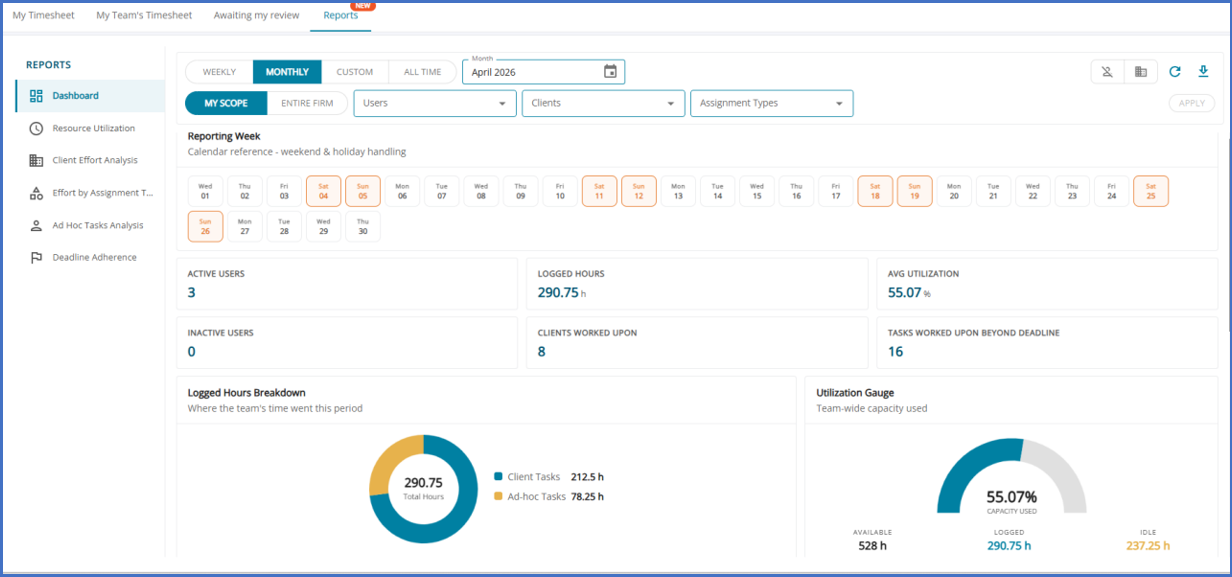
A new reporting suite under Timesheet › Reports, with five dedicated tabs: Due Date Adherence, Resource Utilization, Effort by Assignment Type, Client Effort Analysis, and Ad Hoc Tasks Analysis.
Role-based Visibility — supervisors see their team’s data, auditors can opt to view the whole team, and everyone else sees only their own.
A common filter bar (Assignment Groups, Types, Users, Clients, Period) and an Excel export are available on every tab.
Configurable thresholds - Idle Time and new Performance thresholds are configurable under Timesheet Settings, with sensible defaults applied automatically.
2. Doc Request Dashboard — Overview
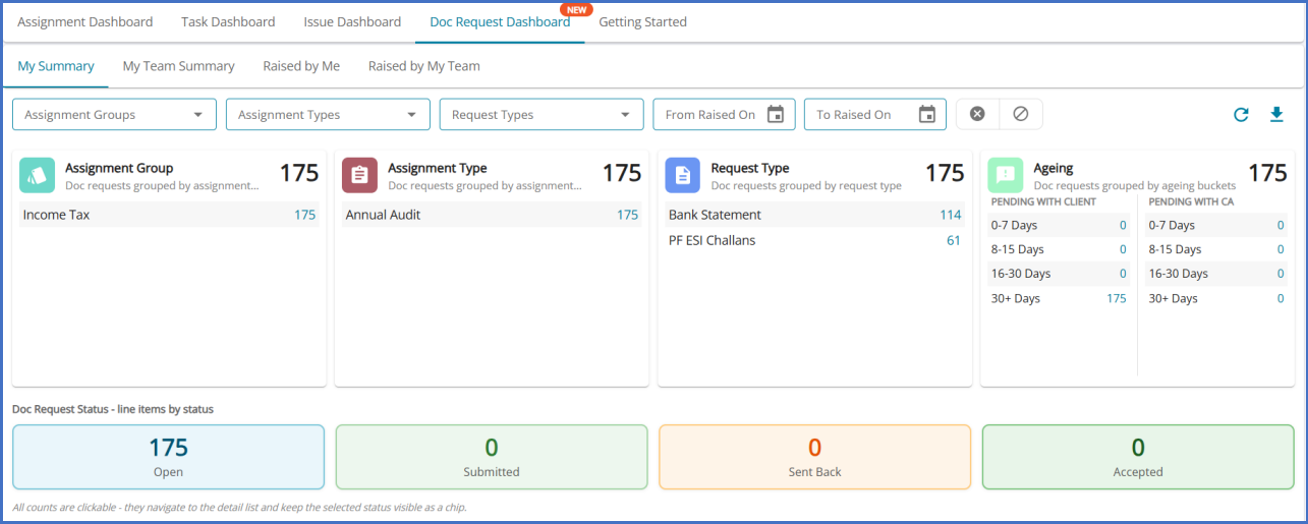
A new top-level, consolidated dashboard for tracking document requests across every assignment — replacing the previous dashboard.
Audit team members get four views: My Summary, My Team Summary, Raised by Me, and Raised by My Team.
Client users get a focused “Assigned to Me” view, now with summary cards on par with the Issue Dashboard.
Five summary cards — Assignment Group, Assignment Type, Request Type, Ageing, and Doc Request Status — each drill down into a pre-filtered list.
3. Doc Request Dashboard — Ageing at a Glance
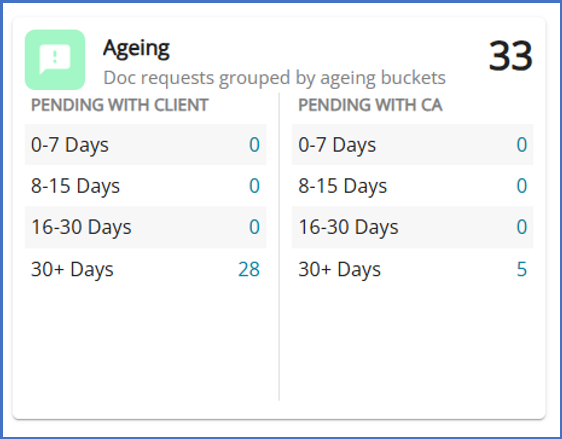
Status groupings
(i) “Pending with Client” covers Open and Sent Back requests;
(ii) “Pending with CA” covers Submitted requests awaiting the audit team.
Four ageing buckets — 0–7, 8–15, 16–30, and 30+ days — with a dedicated, line-item level Ageing Detail view.
Every card and list is clickable, taking users straight to the right pre-filtered view; Ageing Detail also exports to CSV.
4. NPO Funds Statement Format for Trusts
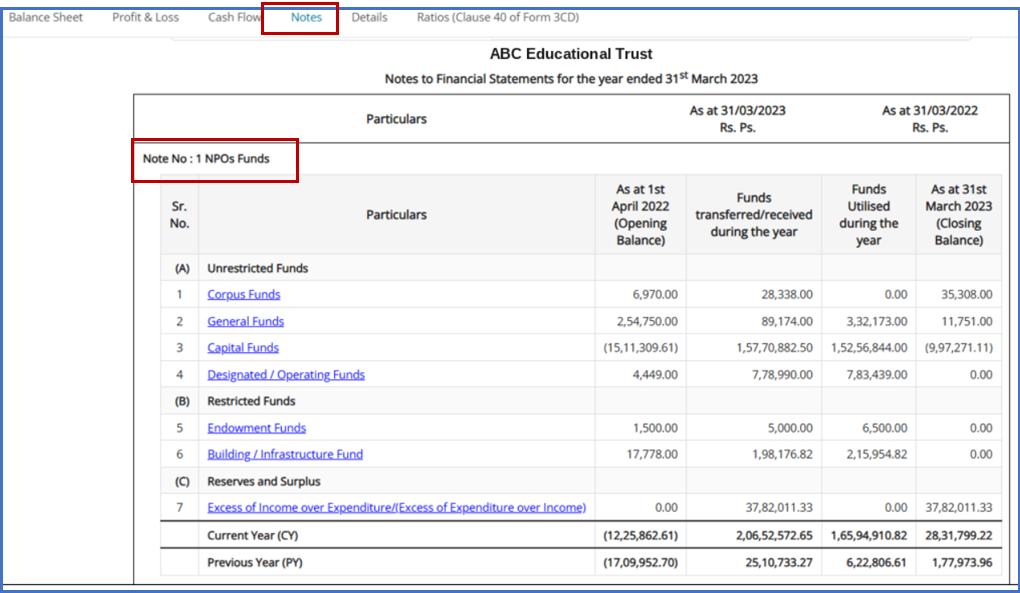
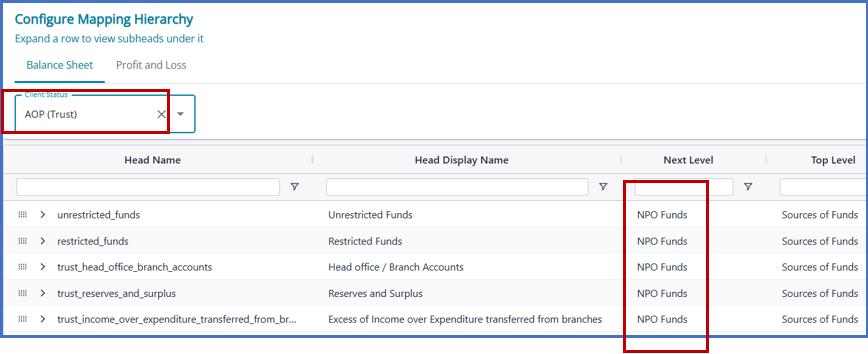
Paired with a Chart of Accounts customization for Trust clients
Available for export in PDF, DOCX, and Excel, alongside the other statement formats.
5. LLPIN Support (Limited Liability Partnership Identification Number)
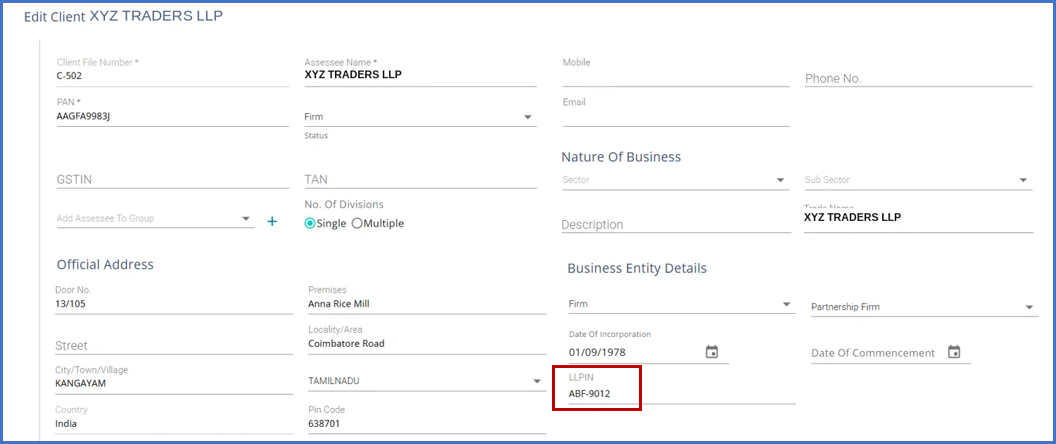
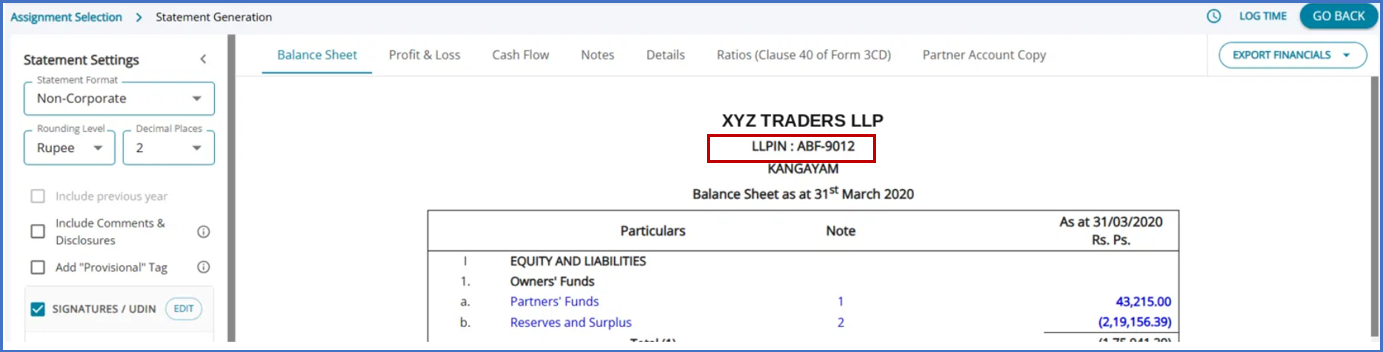
LLP and Partnership clients can now record their LLPIN (Limited Liability Partnership Identification Number) during onboarding.
An optional field — similar to CIN field for company clients.
Now visible in report headers and in exported statements (PDF, DOCX, and Excel) for LLP clients.
6. Previous / Next Period Navigation
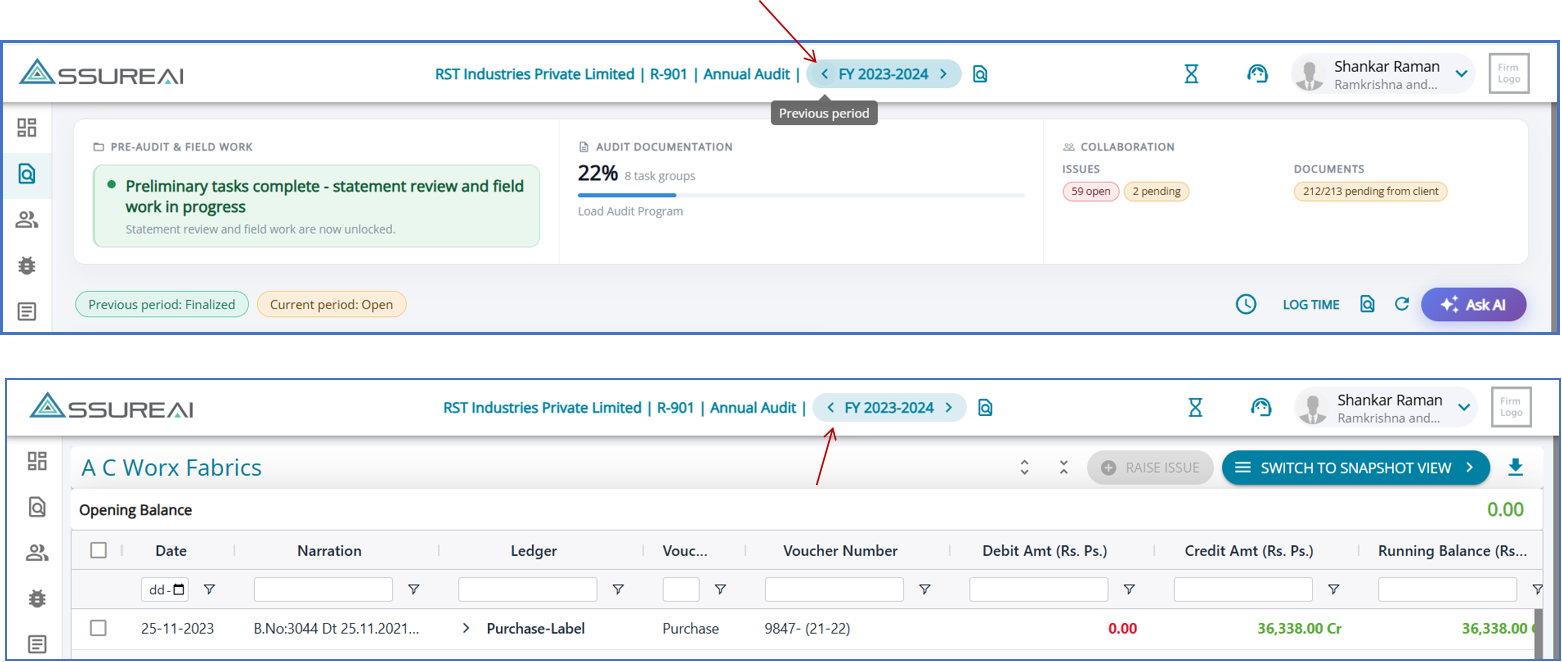
One clear pair of arrow controls to move between adjacent periods — from the top bar on every page, and from Ledger View.
From a task page, navigation opens the same task in the target period when it’s available, or that period’s landing page when it isn’t.
At the earliest or most recent period, a short message lets you know you’ve reached the boundary.
7. Profit from discontinuing Operations in P&L
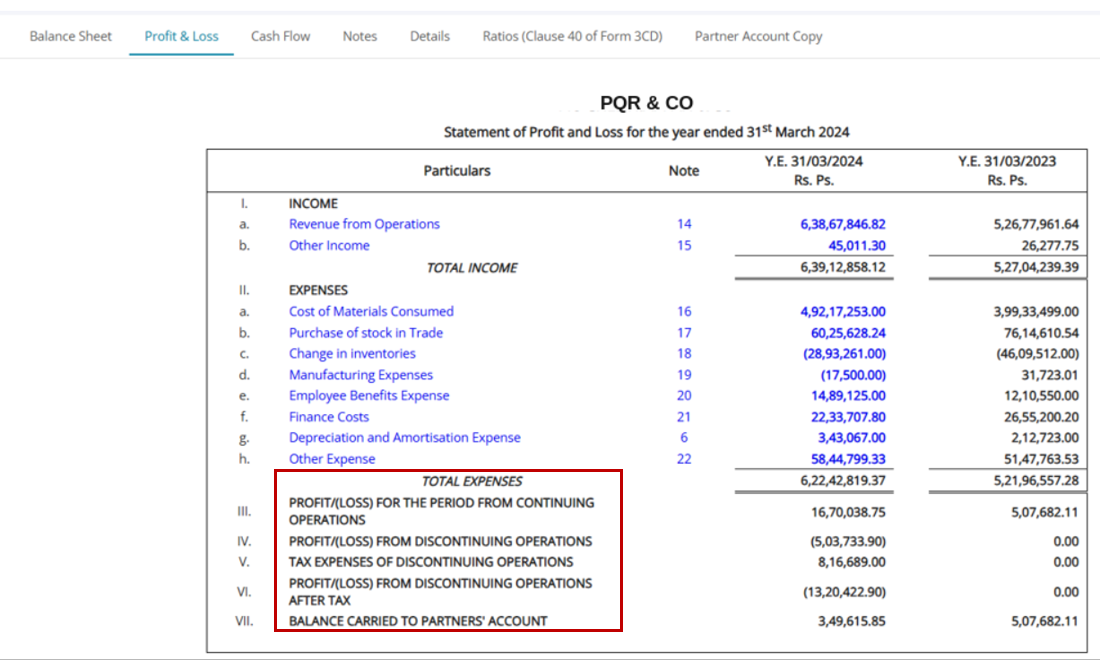
New line items and calculation logic correctly present discontinued operations in the Profit & Loss statement.
“Profit after tax” is relabeled to “Profit/(loss) for the period from continuing operations” whenever discontinuing-operations amounts apply.
Two new heads added: (i) “Profit/(loss) from discontinuing operations” and (ii) “Tax expense of discontinuing operations.” Rolled out automatically to all firms, and carried through consistently across on-screen, Excel, and PDF views.
Other corrections - Exceptional, Extraordinary, Tax expenses – Marking them mandatory will now generate more consistent headings in P&L, even if the figures zero.
II. Enhancements
1. Work Paper Issues
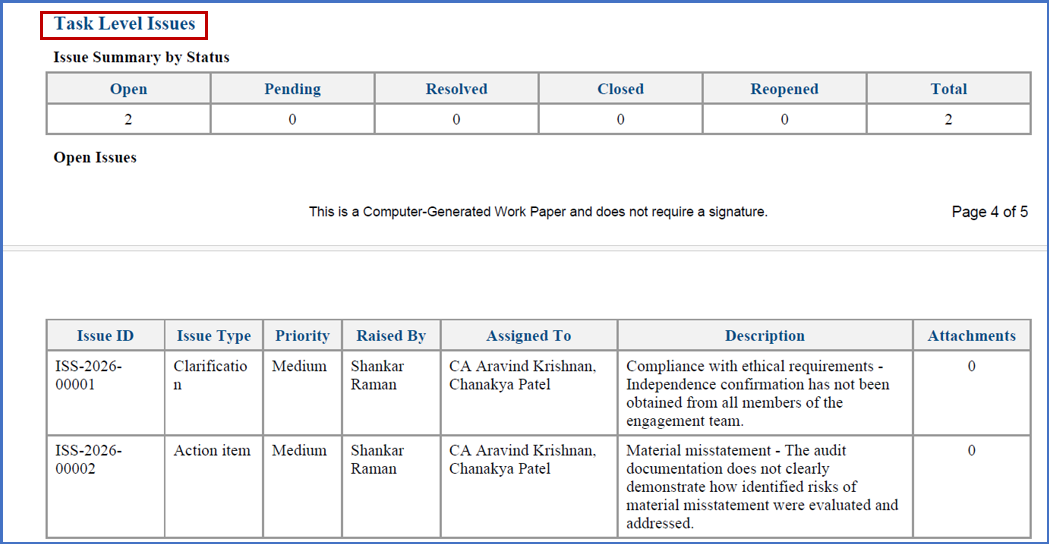
- Task-level issues are now included in Work Papers ( based on inclusions)
- Issues are included in the Workpaper folder under a dedicated Issues folder.
- A Long Format Excel file contains all task-level issue details.
- Attachments are stored in separate Issue ID sub-folders within the Issues folder.
- Consistent Excel column formatting across all issue export screens.
2. Statement Generation
- Removed the 140-character limit on subhead-level comments.
- User-adjusted table and column widths now carry through to PDF exports.
3. Flexible Initiation of Annual Audit Assignments
AssureAI now provides greater flexibility in initiating annual audit assignments across financial years.
Previously, assignments had to be initiated strictly in chronological order. This meant that if a user initiated a subsequent year's audit and later realized that the previous year's books were required—for example, for Opening Balance verification—the previous year's assignment could no longer be initiated.
The restriction has been lifted now. With this enhancement, users can initiate an annual audit assignment for a prior period even after an assignment has been initiated for a subsequent period.
Important points to note:
- Periods must be continuous: There cannot be any gaps between the periods for which assignments are initiated.
- Finalized periods cannot be bypassed: If the subsequent period is already Finalized, the prior-period assignment cannot be initiated. The subsequent-period assignment must first be unfinalized.
III. Fixes & Polish
1. Financial Statement Exports
- Corrected shareholding percentage rounding, missing CIN on export sheets, and consolidated ratio sub-totals.
- Fixed partner name/designation overlap in signatory blocks.
- More consistent decimal-place handling across ratio values in PDF, DOCX, and Excel.
2. ITR Excel (Genius / CompuTax / WinMan)
- Fixed missing intangible-asset values for AOP, Individual, and Firm clients.
- Fixed placeholder text appearing instead of real values, and blank custom ITR keys on existing firms.
- Corrected sheet mapping for tangible assets.