
Add Adhoc Attachments
Add Adhoc Attachments

1. On the Load Audit Program screen at an assignment/task level, an 'Attachments' tab has been added. The 'Add' button allows users to add new attachments.
2. Attachments not previously configured can be added at this level.
3. The "Add" button will enable the user to add attachments by filling in the required details in the pop-up.
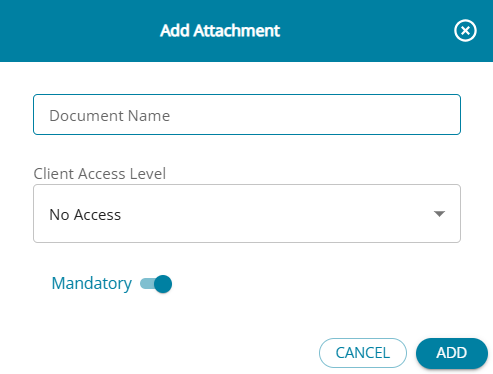
- Document Name is a mandatory field, and that must be unique.
- The default selection for "Client Level Access" is "No access," and the user can choose the required option from the drop-down.
- The task can be marked as "Mandatory" if required
- Attachments marked as mandatory will have a * marked beside the attachment name.(highlighted in red)
4. The Action Column will be included in the table for attachments with "Edit" and "Delete" options
5. The edit and delete buttons for attachments configured under the task management screens will be disabled. For these attachments, the edit/ delete should be done under the "Configure Attachments" screen only
6. The edit & delete buttons are enabled for the attachments added on this screen.
7. On clicking "Edit," the pop-up screen will be displayed with details for the attachment, and changes can be made and saved.
8. The attachment only applies to the assignment in which it has been added. It does not apply across assignments
9. Once the assignment is closed or finalised, the "Add" button will be disabled, and no more attachments can be added.
10. This feature is available only for firm users and not client users.
11. The assigned Client Access Level is displayed for all task-level attachments, ensuring clearer understanding of client permissions across tasks and related documents.