
Preliminary Tasks - Data Validation
Data Validation
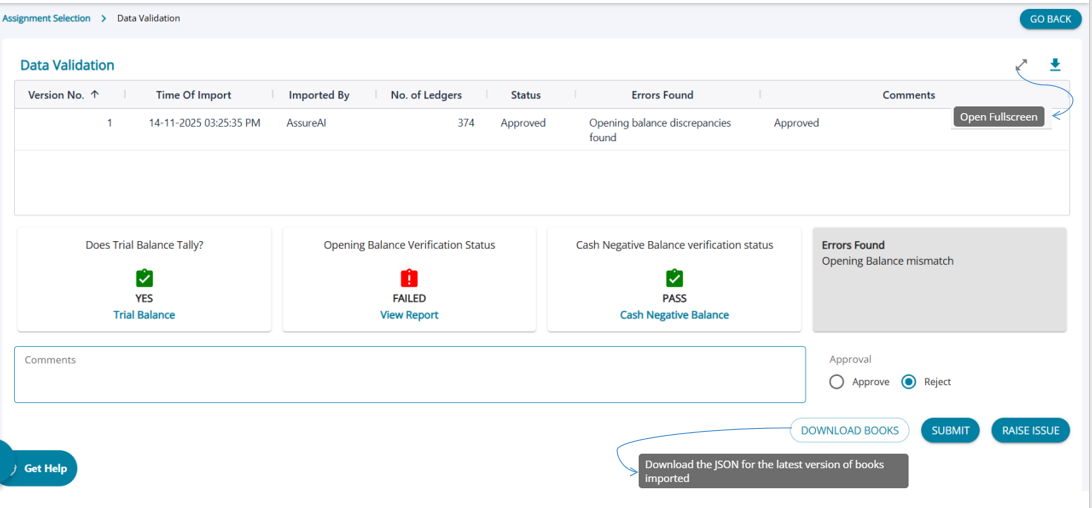
1 .There are 3 data validations that the system performs by default , however, if one of the validations fail, the system indicates that the user needs to reject the accounts that have been uploaded.
2. The user needs to add comments which is mandatory indicating why the accounts are being rejected
3. However, the user can still go ahead and approve the accounts and move to the next step, in which case comments are not mandatory.
4. Any issues that the user wants to raise has to be done from this screen .
5. Immediately upon import of JSON file, certain automated validations are carried out by the system
6. Click on the ‘Data Validation’ button under Preliminary Tasks
7. There are three types of Validations done
(a) Does Trial Balance Tally?
(b) Opening Balance Verification Status
(c) Cash Negative Balance verification status
8. If any of the validation is failing, then report will be shown to the user which is also downloadable in Excel
9. The user can raise an issue from this page using the ‘Raise Issue’ button on the bottom right corner of the screen
10. After review of the validations, the user can either click approve or reject and press ‘Submit’ button
11. Only after approval, the next process namely “Ledger Classification” button will get enabled
12. Comments are mandatory in case of rejection of the data version
13. A log of all the approvals and rejections with comments will be saved and shown in the top of the data validation screen.