
AssureAI Release Note- Statement Generation Revamp_July 2026
Smarter Financial Statements
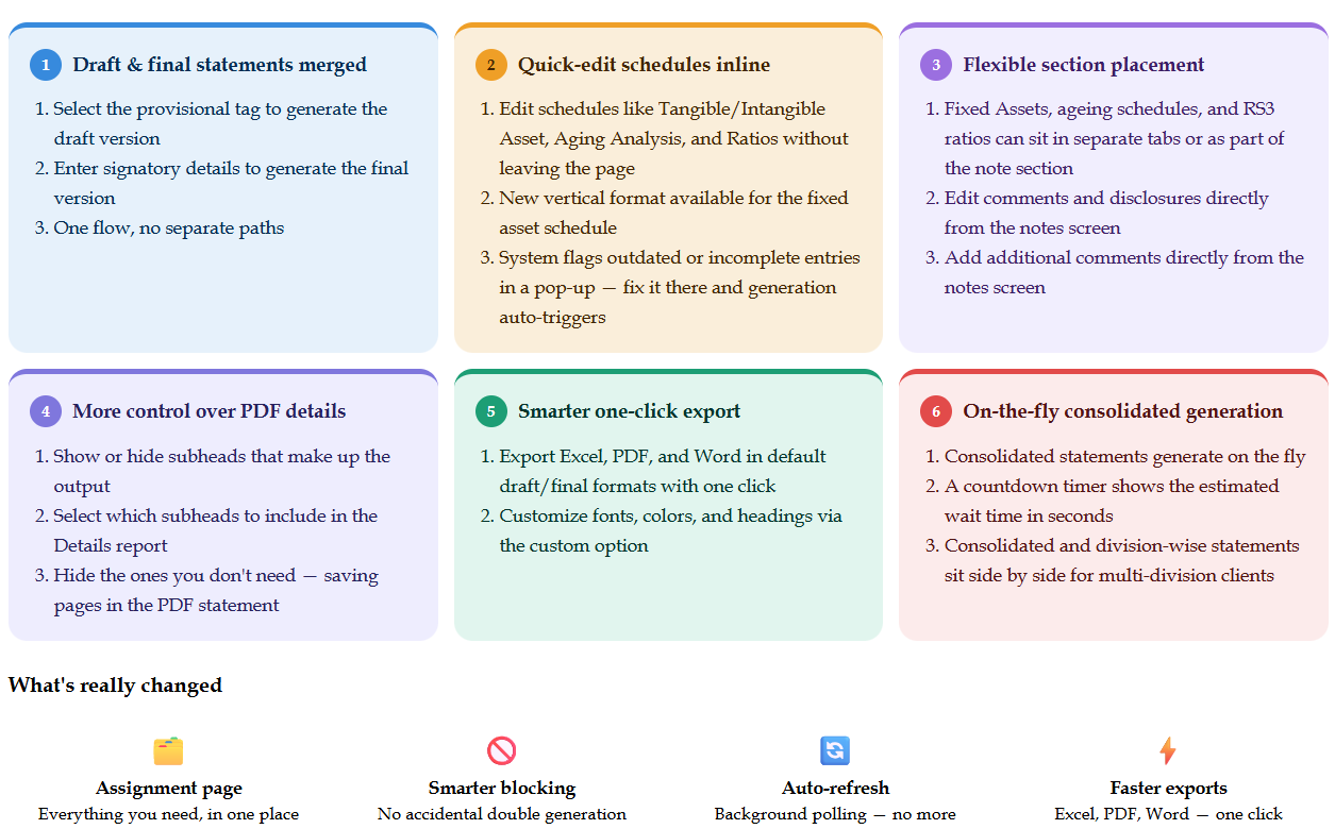
1. Revamped generation adds provisional and final controls with scope-aware exports to PDF, Word, and Excel.
2. Automatic detection of outdated (stale) data across sub-schedules like fixed assets, ageing analysis, and ratios keeps every statement current, with inline editing on the spot.
3. Multi-division consolidation made seamless with the ability to view Division and Consolidated Financials side-by-side.
Unified Engagement Management
A single audit home page centralizes pre-audit health, live pipeline status, documentation tracking, and embedded client collaboration, keeping the full engagement on one screen.
Ask AI – Enriched
Ability to overcome Context-size limits, attach incremental context for follow-up questions. Added a deterministic approach for computation of numbers and introduced new models.
Broader Compliance Reach
ITR Excel now spans CompuTax, WinMan, and Genius with AY 2026-27 templates, alongside Form 3CD fixes across Sections 40A(2b), 43B, 269SS and 269T.
-------------------------------------------------------------------------------------
I. Smarter Financial Statements
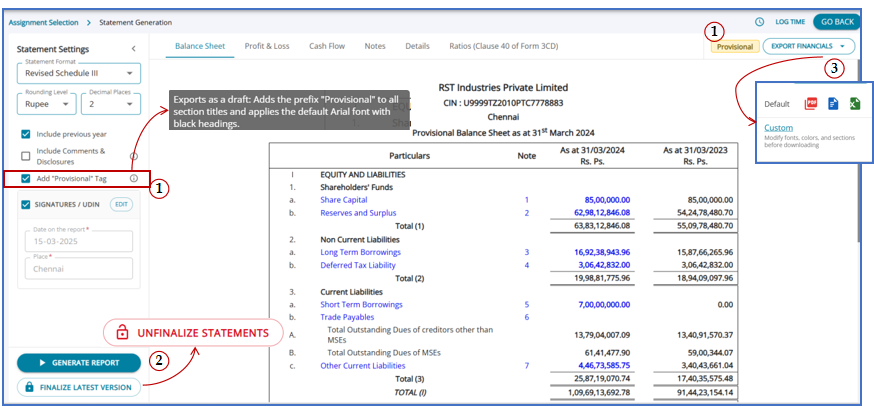
- Merge Draft and Final Options
- Finalize and Unfinalize actions available directly on the screen for quicker report management.
- Default Export options for PDF, Excel, Word, along with an option to customize
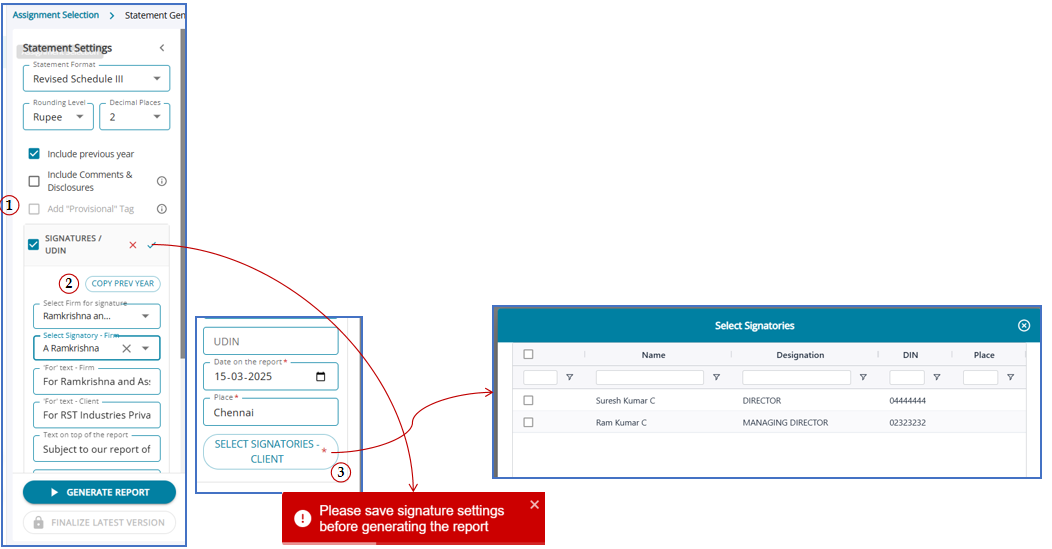
1. Settings – Draft Vs Final Statement
For Final Statement
- Uncheck 'Add "Provisional" Tag’
- Enter Firm and Client Signatories manually or copy from the previous year using the new 'Copy Prev Year' option.
- Select Client Signatories from the popup
- Save signatures/UDIN before statement generation can be initiated.
For Draft Statement
1. Select “'Add "Provisional" Tag’.
2. Only Date and Place are visible
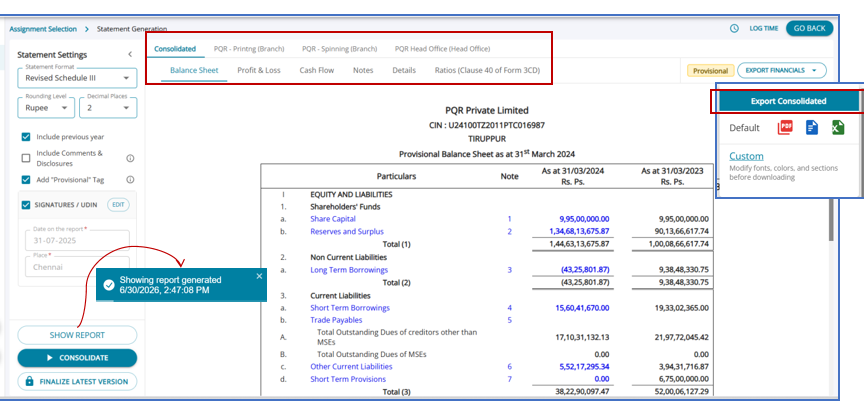
2. Multi-division consolidation
1. Consolidated Financial Statements are available only after Preliminary Tasks are completed for all divisions, ensuring accurate and complete reporting.
2. Seamlessly switch between Consolidated and Individual Division views.
3. Regenerate Financial Statements from either the Consolidated or Division page.
4. Last Generated timestamp displays when the consolidated report was most recently updated.
Context-aware Export button clearly indicates the download scope:
- Export Consolidated on the Consolidated tab.
- Export [Division Name] on individual Division tabs.
3. Notes and Details
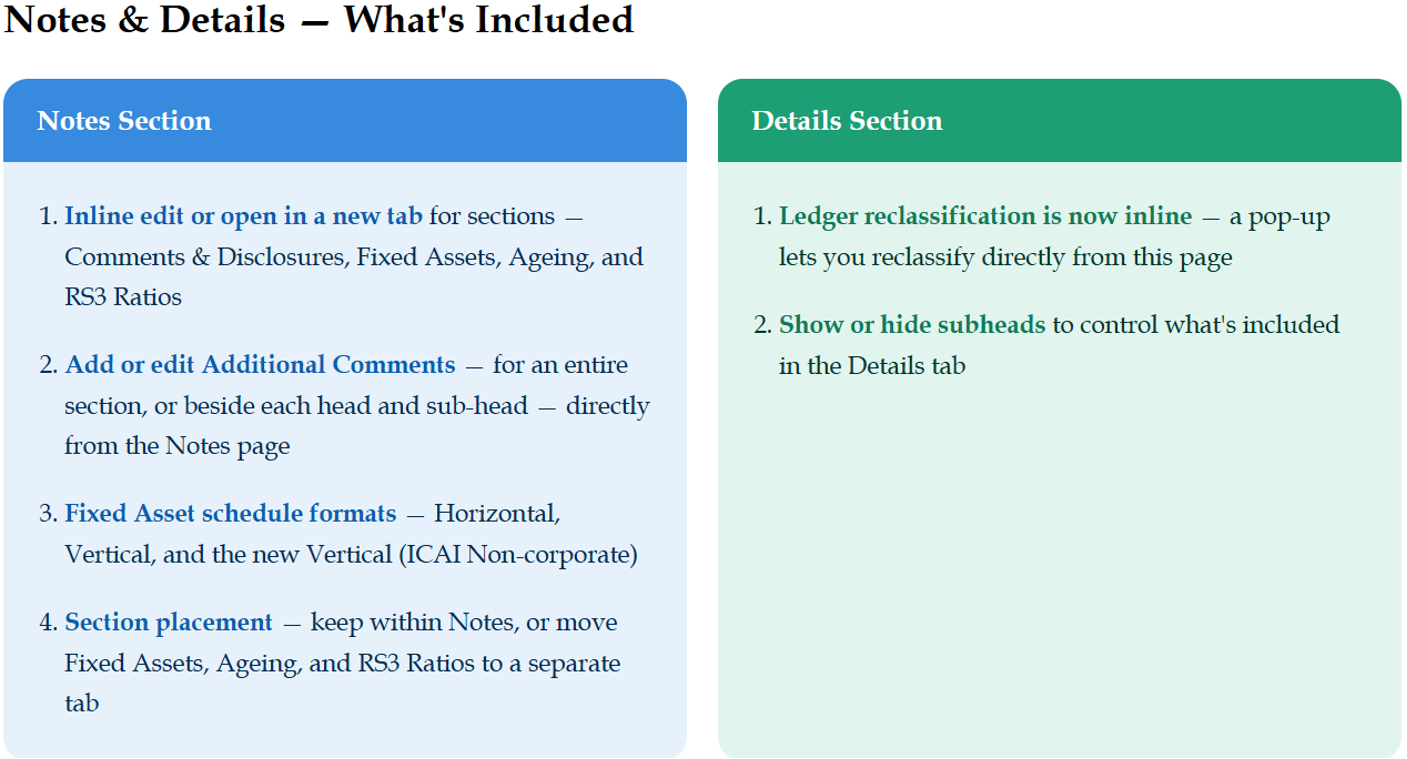
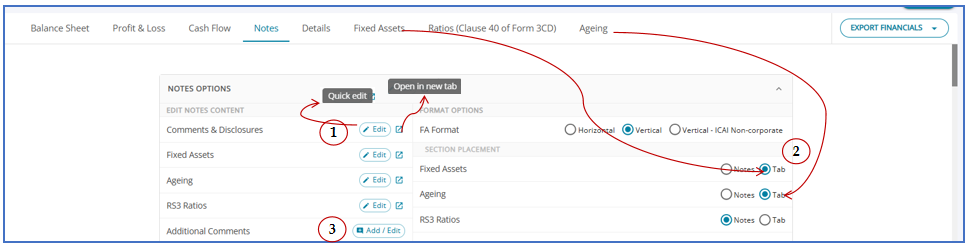
The Notes & Details section has been redesigned to provide a faster, more flexible editing experience with minimal navigation.
1. New Quick Edit panel for faster note updates.
2. Flexible editing with inline or pop-out editor options.
3. Configurable layout – display notes within the section or as separate tabs.
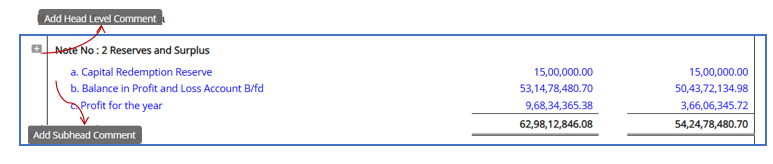
4. Quick Add/Delete of Additional Comments at both Head and Sub-head levels using the + callout icons.
1. In-Statement Ledger Reclassification: Ledger reclassification option moved under Details tab to align previous year's ledger subhead mappings with the current year, ensuring meaningful comparative financial statements.
2. Show/Hide Subheads: Control the visibility of subhead rows under Details. The selected preferences are retained and applied to exported PDF reports.

4. Stale (Outdated) Status detection and alert
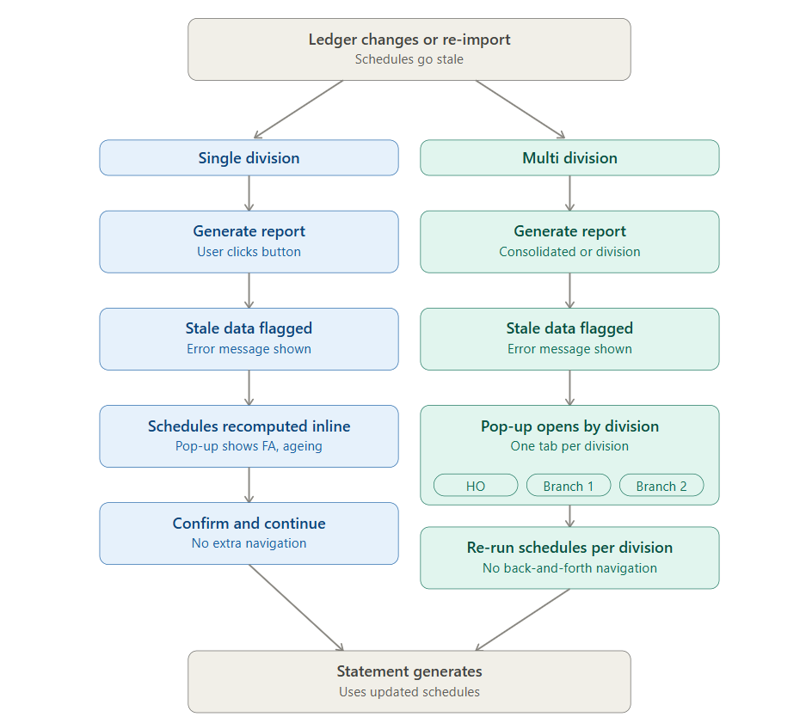
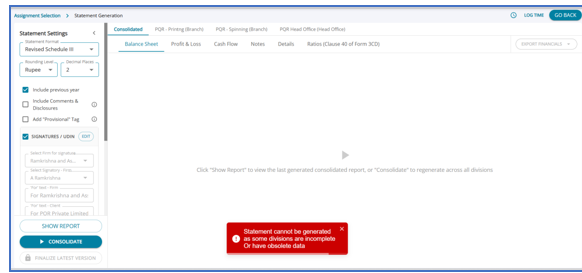
Smart Sub-schedule Review
When the underlying books change (new imports, ledger classification updates, or voucher entries), affected Sub-schedules are automatically flagged for review.
- Automatic alerts notify users of impacted schedules.
- Inline review via a pop-up window eliminates the need to navigate between screens.
- Ensures Financial Statements always reflect the latest data.
4.1 Stale (Outdated) Status detection: Fixed Assets & Ageing

1. Automatic validation detects outdated or incomplete schedules before generating statements.
2. Inline pop-up editing for Tangible Assets and Ageing Analysis schedules.
3. No navigation required—update values directly from the statement generation screen.

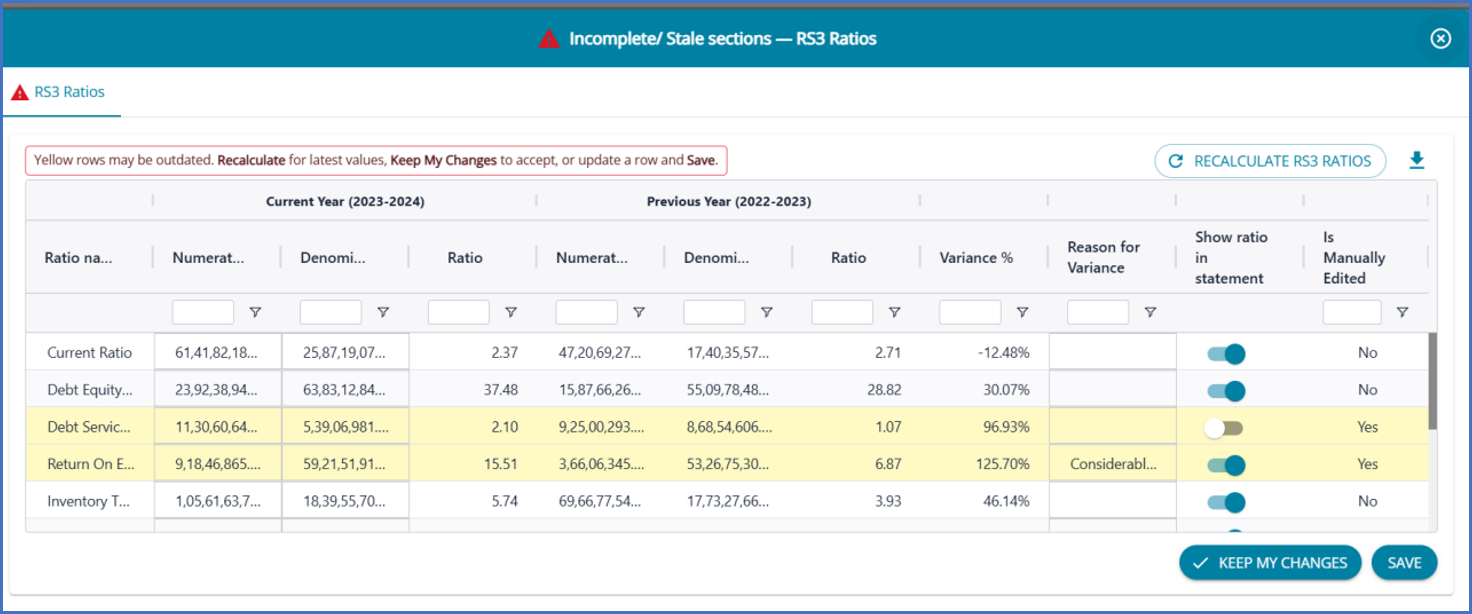
4.2 Stale (Outdated) Status detection: Ratios
After a report is generated successfully, a second automatic stale check runs for Revised Schedule 3 Ratios. If ratio numerator and denominator were previously updated manually, a dialog is shown prompting the user to review them post-regeneration.
Users can keep the changes or edit/ update the values on the screen.
5. Other Enhancements
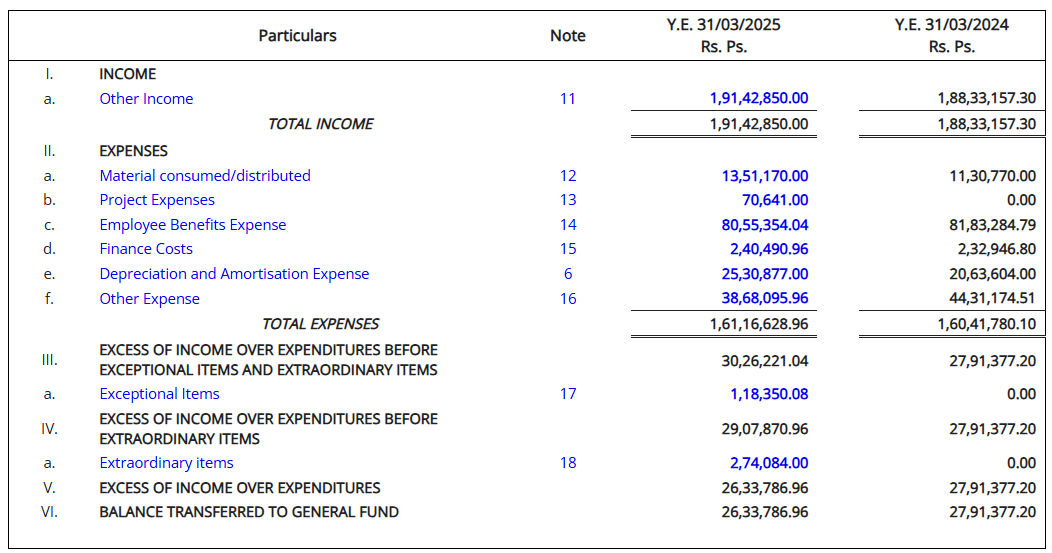
P&L statement – Ability to customize the wording for Profit /(Loss) section from the backend
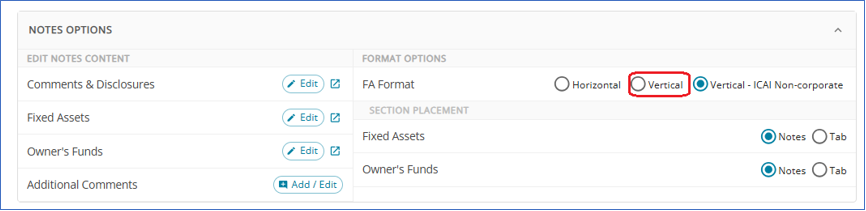
NPO Financials Non-Corporate Financials format available for AOP(Trust) clients
Income and Expenditure statement wordings refined Upcoming – NPO Funds Schedule in Notes
II. Unified Engagement Management - Assignment Home page
1. New Audit Assignment Home Page for a centralized engagement overview.
2. Pre-Audit Health bar to assess audit readiness at a glance.
3. Live Pipeline Status Cards showing real-time progress across audit stages.
4. Audit Documentation Progress Tracker for monitoring completion status.
5. Embedded Issues & Document Request Dashboards for quicker follow-up and resolution.
6. Year-over-Year Status Indicators to easily compare engagement progress across periods.
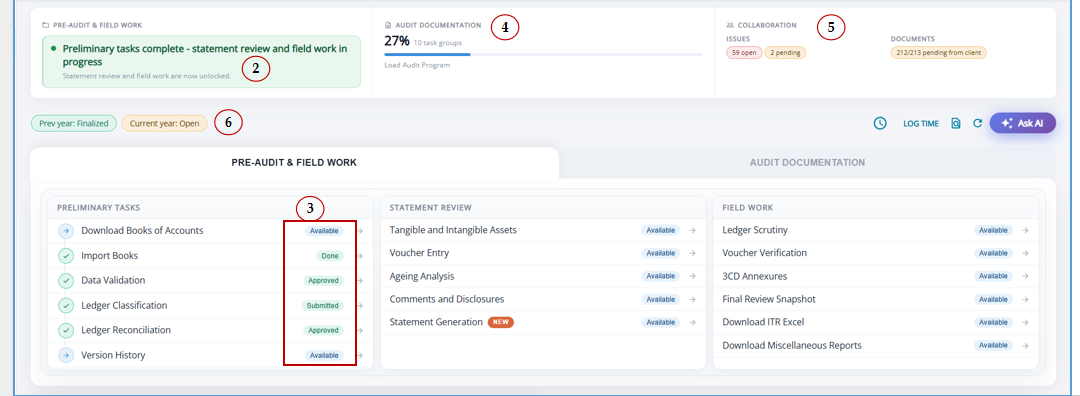
1. Pre-audit health strip
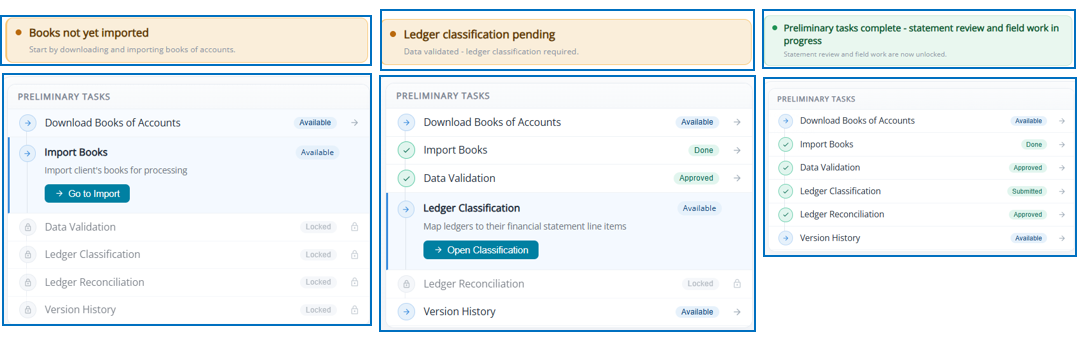
2. Smart Progress Indicators – Statuses such as Available, Done, Submitted, Approved, and Locked are updated automatically to reflect the current audit workflow status, enabling better visibility and control over engagement progress.
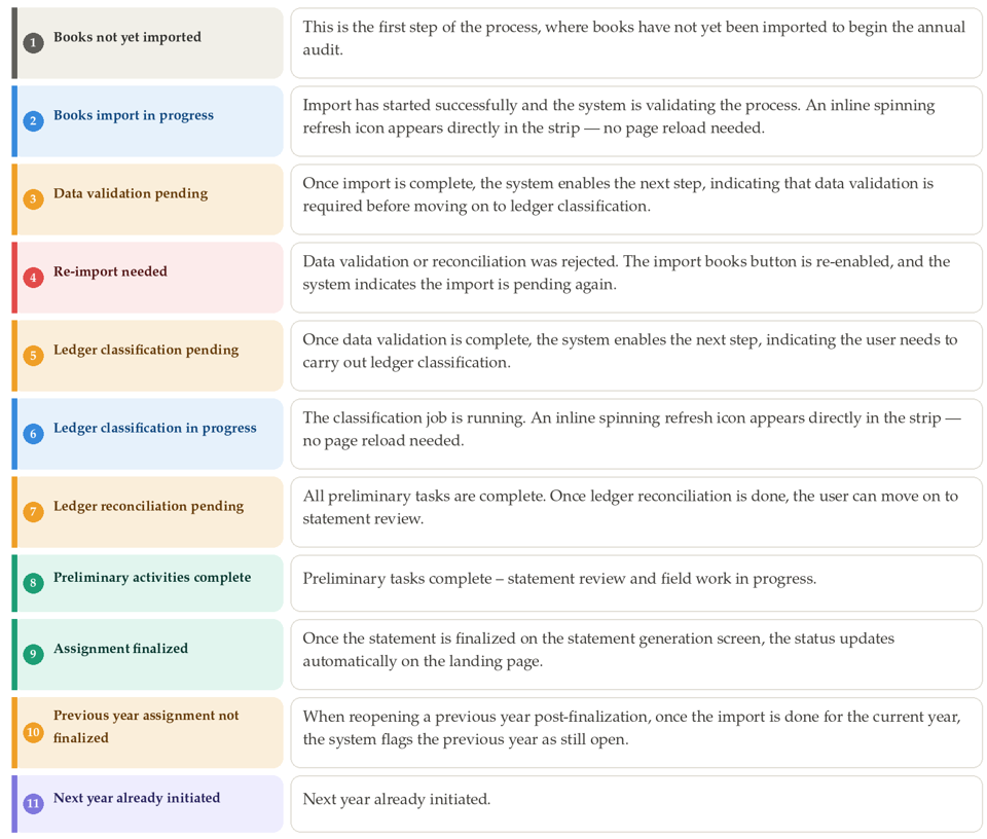
The Pre-audit & field work Summary Strip shows a color-coded description line. It is a computed summary of the entire task pipeline — one look tells the auditor exactly what needs to happen next (or why everything is locked).
2. Documentation Progress
Get a real-time view of audit documentation progress to jump straight to pending work from a single dashboard.
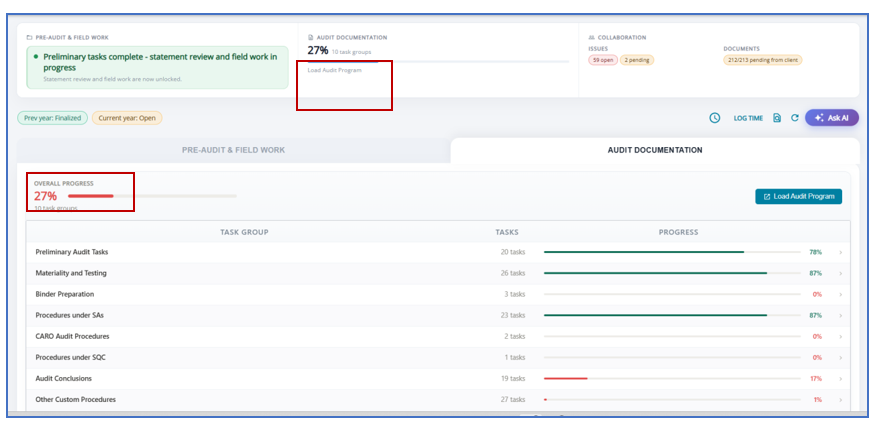
2. Task group progress bars with completion status.
3. Quick navigation to task groups.
4. Real-time progress updates.
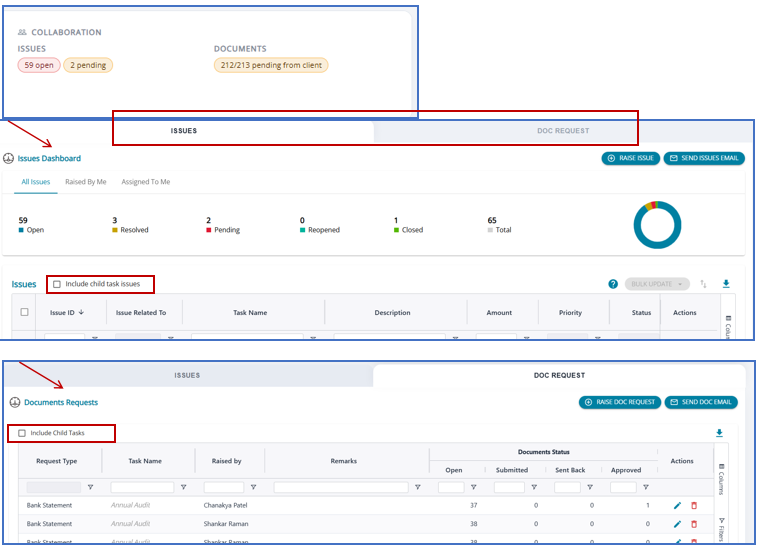
3. Client Collaboration
Manage client collaboration without leaving the assignment page, tracking issues and document requests in real time from one integrated workspace.
1. Tabbed view to switch between Issues and Document Requests.
2. Option to view issues raised against Child tasks
3. Finalization-aware controls to prevent changes to closed assignments.
4. Features moved under Field work
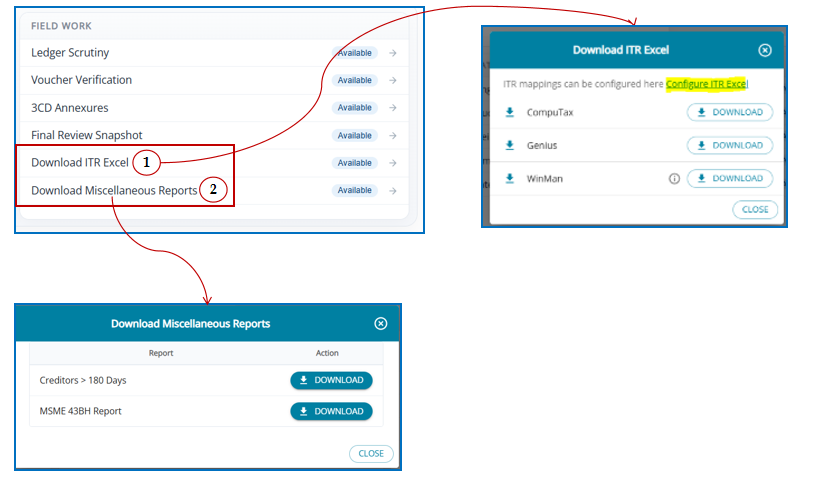
Two new capabilities have been added to streamline audit and tax compliance workflows under field work.
1. ITR Excel Export – Enabled download of ITR Excel from FY 2024–25 onwards. It supports tools - Computax, Genius, and Winman, and displays an ITR Excel configuration link for Auditor users where applicable. Earlier financial years display an appropriate non-availability message.
2. Miscellaneous Reports – Generate and download Creditors > 180 Days and MSME 43BH reports for improved compliance and reporting.
III. ITR Excel generation - Enhancements
1. Support for WinMan added
2. Revised CompuTax templates configured
3. Ability for the user to copy mappings from previous template in one click

IV. Enriched Ask AI
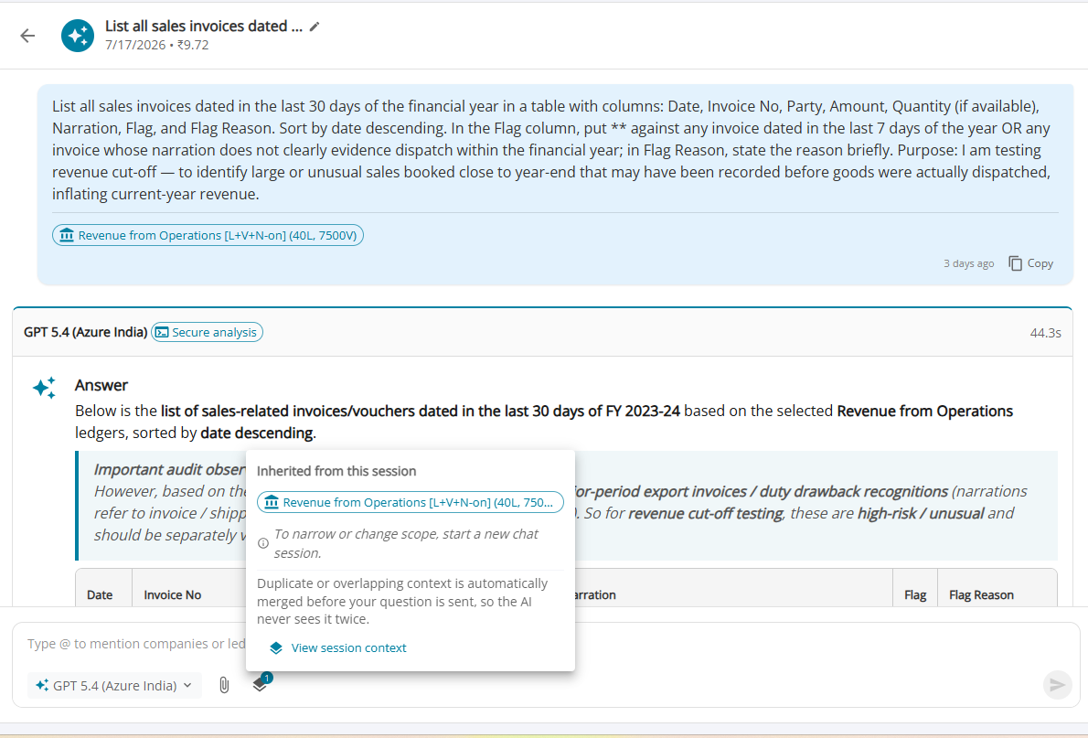
1. Context size restriction of various LLM models overcome – Now attach large contexts and interact with your favorite model directly
2. Inbuilt algorithm to Optimize Input token cost – Now analyze more data for less
3. Attach additional data to the context for follow-up questions in the same thread
4. Inclusion of new models GPT5.4 and Gemini 3.1 Pro
V. Bug Fixes - Form 3CD
Section 40A(2b)
1. Fixed reporting to always consider the gross expenditure amount for related-party transactions, irrespective of TDS deduction.
2. Corrected apportionment logic for clubbed journal entries to report individual expense ledger amounts instead of the net creditor amount.
Section 43B
1. In Step 3 - Bifurcation of closing balance, reporting has been corrected to display only the Closing Balance as on 31st March for each eligible ledger, replacing the previous summary of credit transactions.
Sections 269SS & 269T
1. Enhanced the transaction identification logic to evaluate same-day aggregated receipts and repayments for determining reportability.
2. Introduced running outstanding balance checks, enabling transactions below the threshold to be reported where the outstanding balance and current transaction together exceed the threshold limit.