
AssureAI Release Note- July 2024
Welcome to the July ‘24 release of AssureAI, which includes a mix of new features, enhancements, and bug fixes.
You now have the much-awaited Books of Accounts import via Excel with transactions and Consolidated Financials in Columnar format. There are also a couple of time-saver features, such as the 43BH MSME Ageing report and 3CD Cash Condition (Proviso to 44AB(a)), wherein the system can perform the calculation in seconds, which would otherwise take days or at least a few hours. We have also introduced the “Autofill tags”, a mail-merge-like feature for letter tasks, just in time for the Audit season.
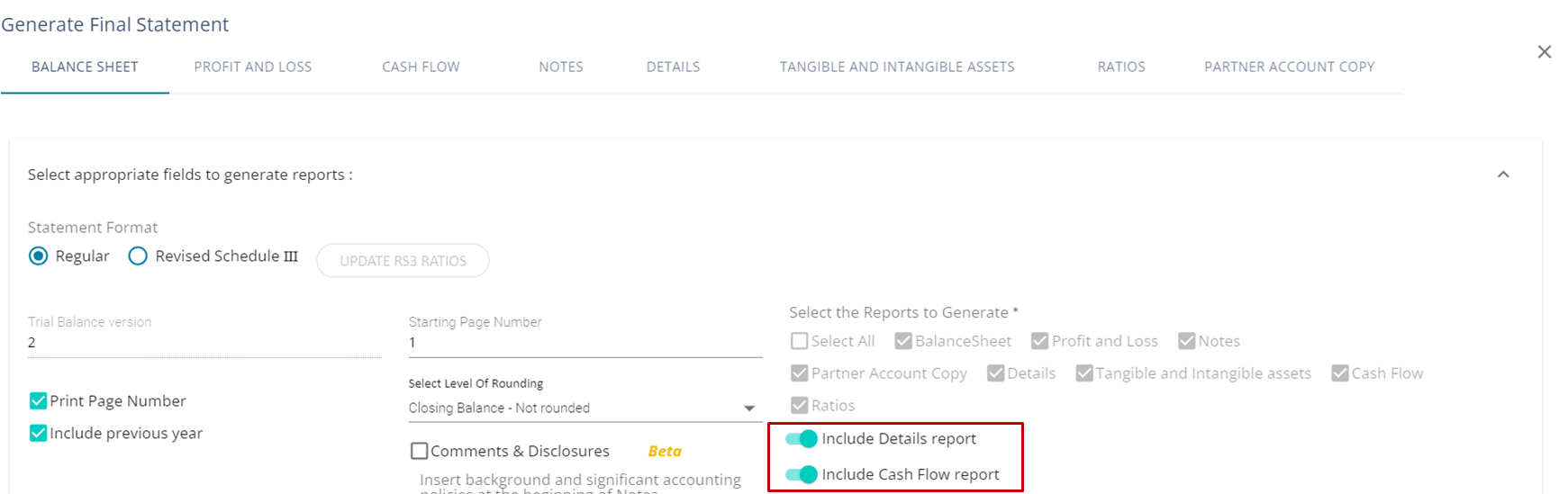
In the enhanced version, you can deselect “Details” and “Cash Flow” sections from the Final statement. Share capital Note in the Financials will now list both the issue and withdrawal transactions separately, not just show the net effect.
Tasks become “read-only” once completed, and letter task templates like MRL can be edited by the auditor before the client signs it, if configured so. You can also control your client users’ visibility to task attachments.
New Features in this Release
1. Auto-fill Letter tags
2. Books of Accounts Import – With Transactions
3. MSME Ageing
4. 3CD Cash Condition
5. Consolidated financials in Columnar format
1. Letter Tags Auto fill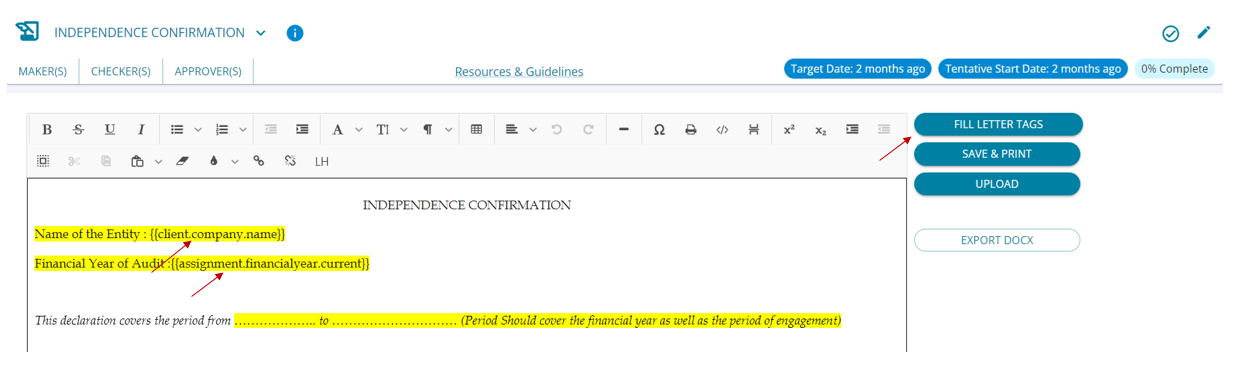
2. Tags have been included in the letter (highlighted in yellow in curly brackets), where information can be filled in automatically on the click of a button.
3. By clicking on the “Fill Letter Tags” button, a pop-up is displayed with all the available tags for the letter.
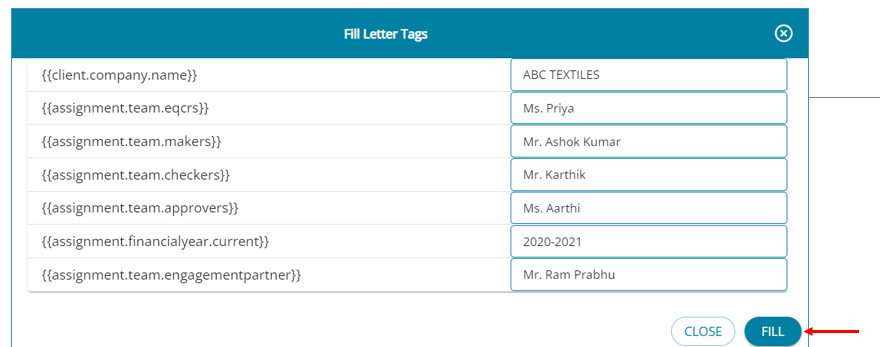
Upon clicking “Fill Letter tags,” the system brings up a pop-up for you to select the values. Tags filled are highlighted in Blue.

2. Books of Accounts Import – With Transactions
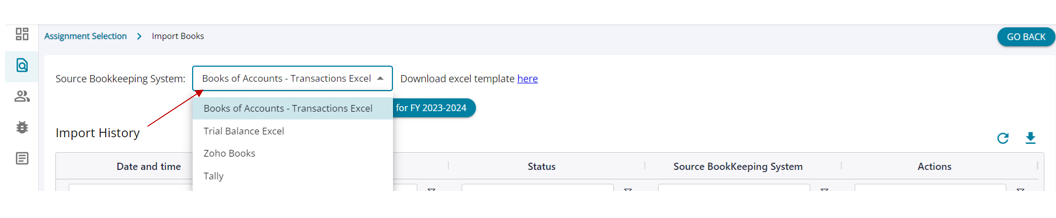
1. For clients who do not have their books of accounts in either Tally or Zoho, the only option earlier was Trial Balance Import Excel, which left a few features unavailable to use in AssureAI.
2. An Excel Import Feature with Transactions has now been introduced. With this, the TB + all transactions from the books of accounts can be uploaded into AssureAI, and all features will be available.
3. The template format in which the details have to be uploaded is available for download.
3. MSME Section 43B(h) - 45 Days Payment Rule
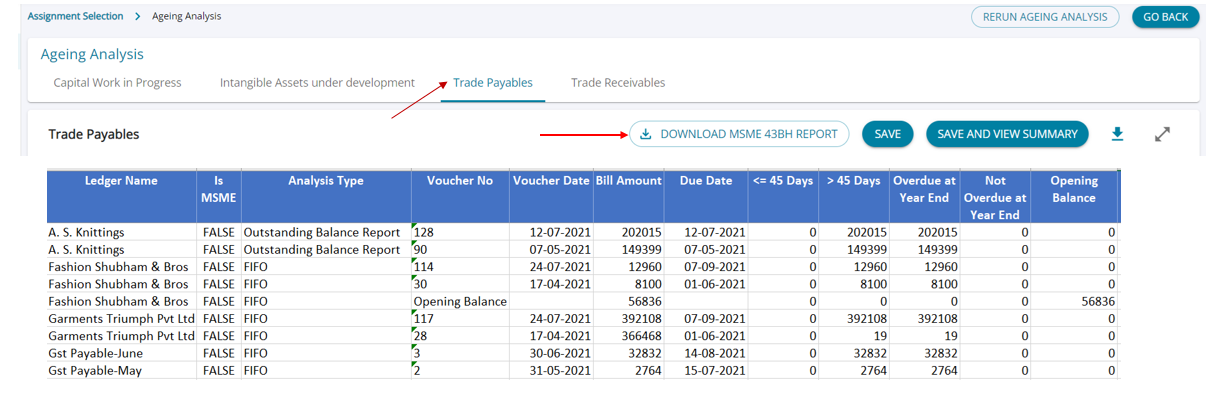
1. Computing Bill-wise pending list along with its status as to whether it’s overdue or not, to quantify the disallowance required under the newly introduced Section 43BH of the Income Tax Act, is a daunting task
2. A new feature is introduced whereby the user can, in a single click, download an Excel file that contains a bifurcation of bills that are ‘OVERDUE’ as per the due date mentioned by the user, as well as bills that are due for less than and more than 45 days.
3. The report can be generated by clicking on the “Download MSME 43BH Report” on the Ageing Analysis screen under Trade Payables.
4. With the help of this report, users can quickly do some Excel calculations and compute the amount that is liable for disallowance u/s 43BH.
4. 3CD Cash Condition - Check Cash Condition for Tax Audit (Proviso to 44AB(a))
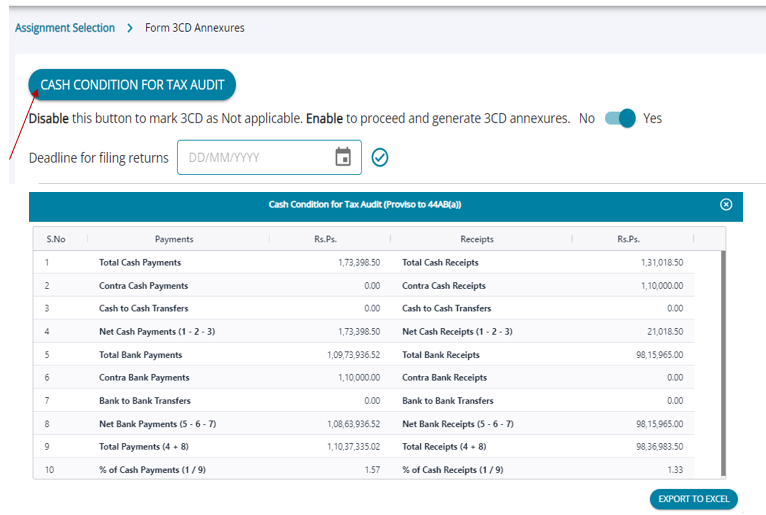
1. The threshold limit for applicability of tax audit has been increased to Rs 10 crore in case cash transactions do not exceed 5% of the total transactions. (i.e., Cash receipts/payments do not exceed 5% of the total receipts/total payments).
2. To save time and effort in computing the Cash condition, AssureAI has automated the calculation of Cash Payments / Receipts.
3. By clicking on the “Cash Condition for Tax Audit” button on the Form 3CD Annexures screen, a pop-up table with a summary of cash and bank transactions is given, which can be downloaded into an Excel spreadsheet.
5. Consolidated Excel for Financial Statements in Columnar Format
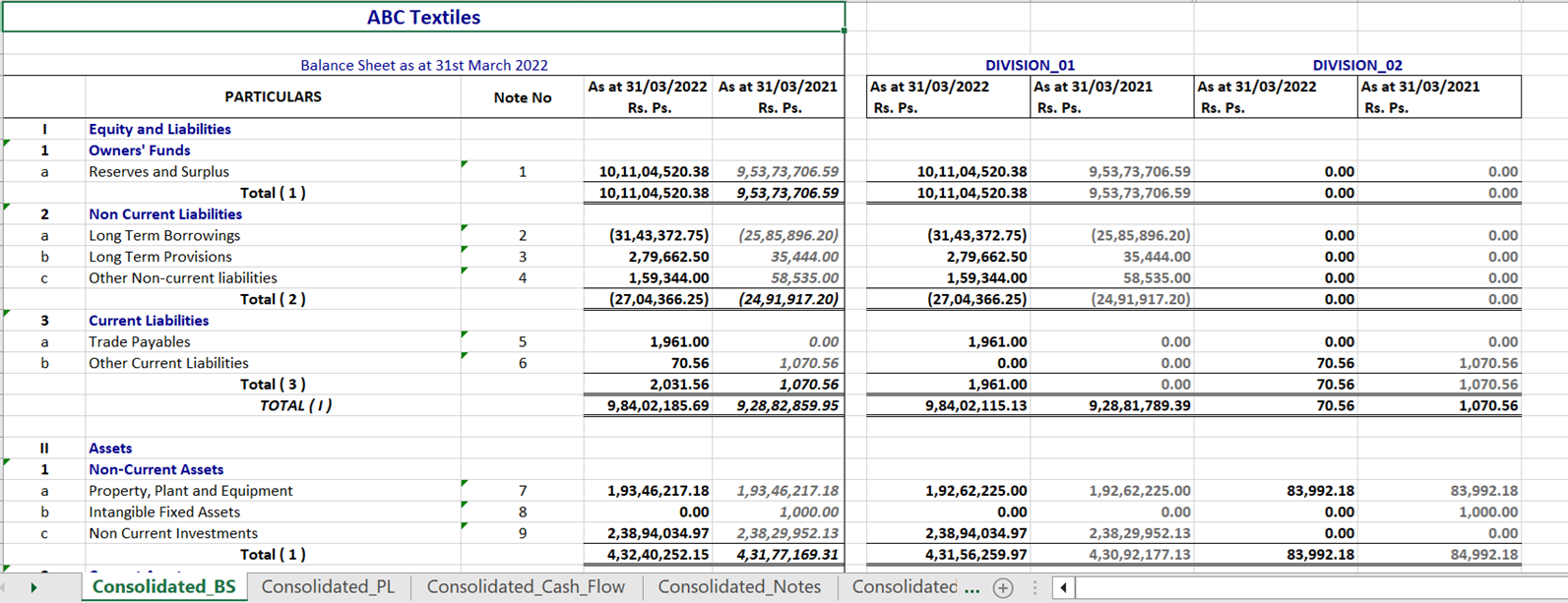
Consolidated financial statements Excel has been updated to provide a single screen view of the Head Office and Branch divisions in the same sheet, instead of in different sheets
Enhancements in this release
1. Client Onboarding / Edit client: The system now auto-populates CIN from the ITR JSON, wherever available.
2. Add Ledger: It is not mandatory to select a parent group name anymore
3. Financial Statement generation Share Capital Notes :
Reconciliation of Share capital at the beginning and the end of the year: The system now captures Share issues and withdrawals separately in this section.

4. Audit Documentation / Task Management
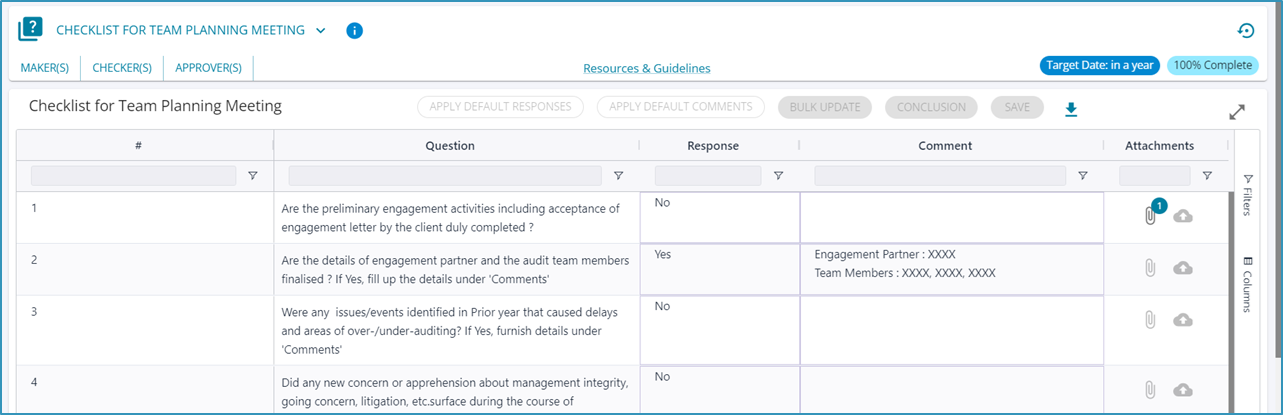
A. Read-only View for
- All Completed Tasks (100% Complete)
- All tasks under a closed (finalized) assignment will now be shown in Read-only mode
- For users who are part of the assignment team but not assigned the task, the view will be read-only
- E.g., Checklist in Read-only mode
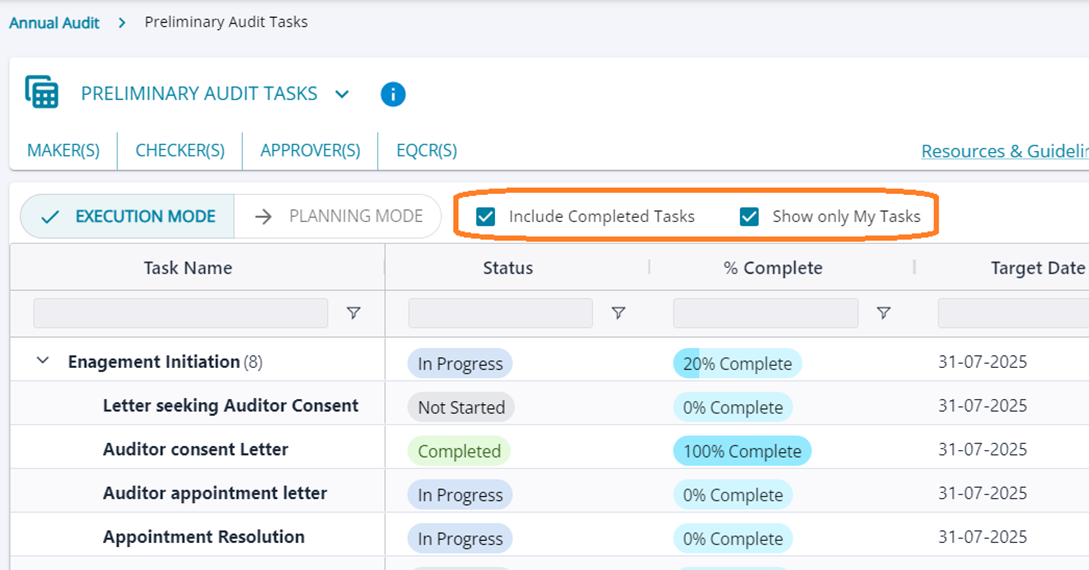
B. Execution View – New Filters
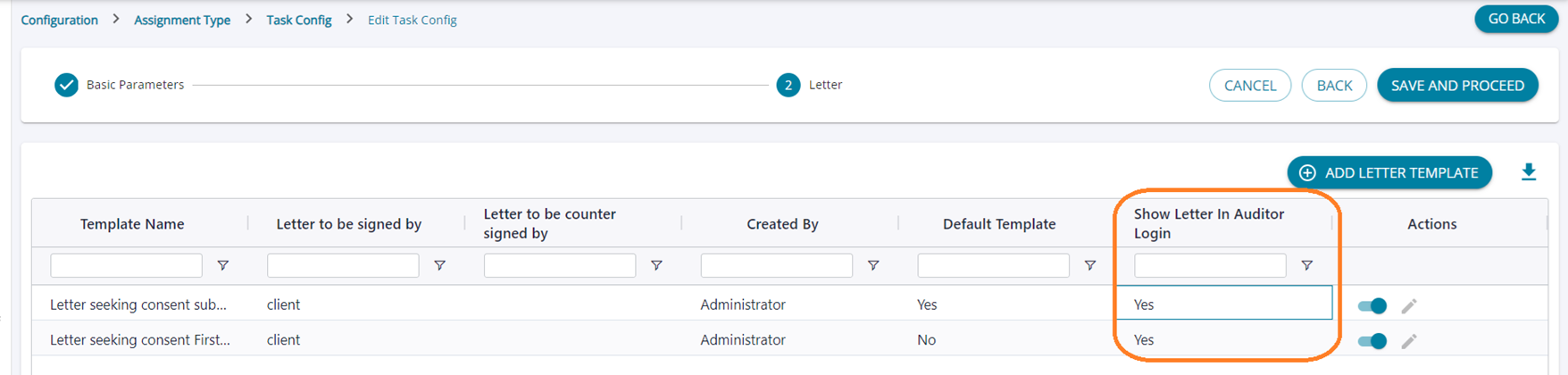
5. Letters to be signed by the client: Ability for the auditor to view and edit the templates before the client's signature
To enable this, edit the task in “Task Management Settings” > “Edit” Assignment Type > “Configure Tasks” > “Edit” Select “Show in Auditor Login” = “Yes"
6. Client access to tasks and attachments
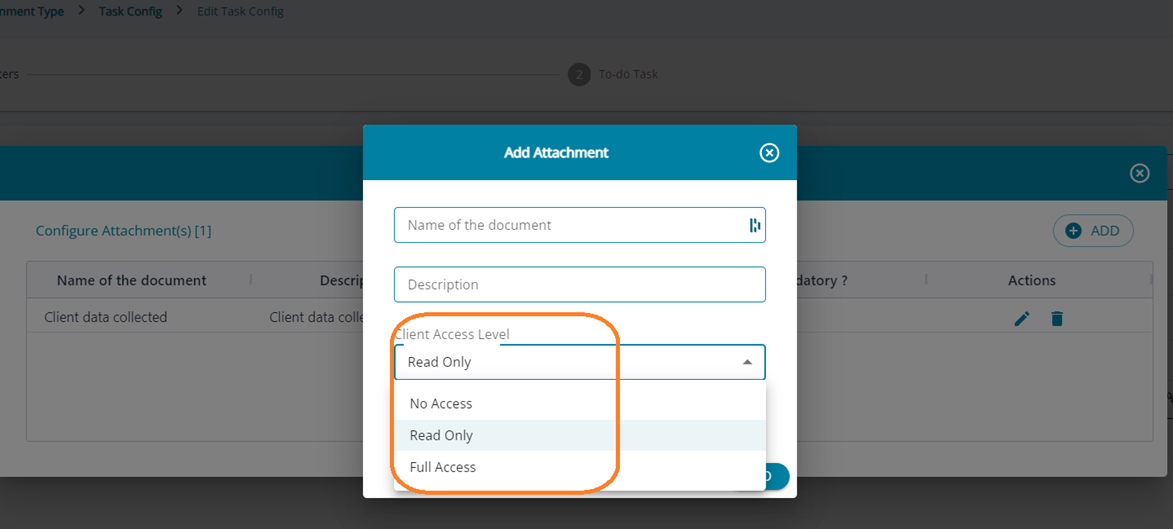
You can now control the client user’s access to Task attachments using Task configuration “Configure Tasks” > “Step 1 – Basic attributes” > Attachments
7. ZohoBooks Import – Ability to configure Customer / Vendor advance ledgers
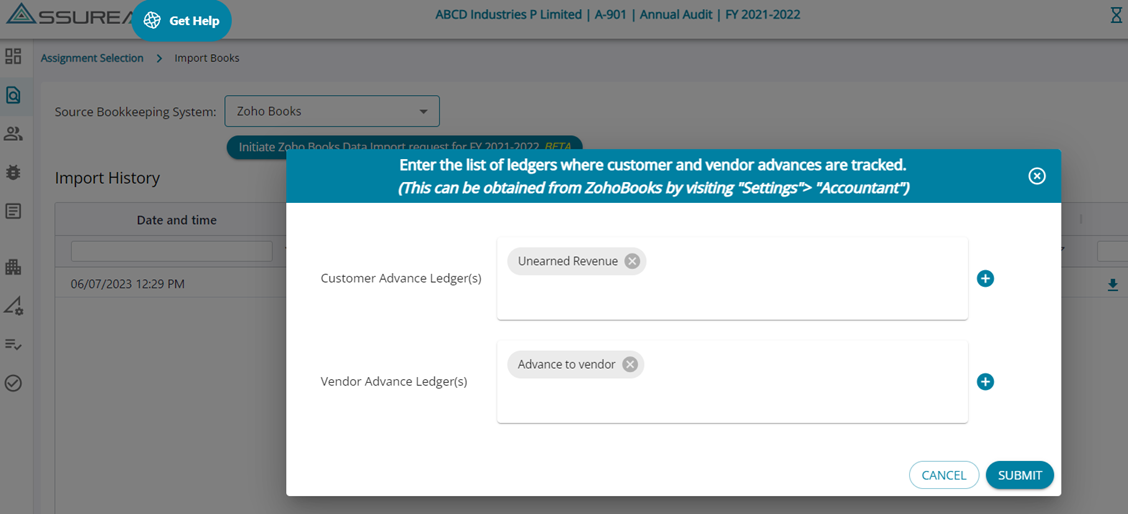
ZohoBooks tracks the vendor/customer advance transactions against separate ledgers; however, in AssureAI, for ageing analysis, the advance transactions are tracked against each party. To enable this, you can now directly configure the advanced ledgers while initiating an import from Zoho Books.
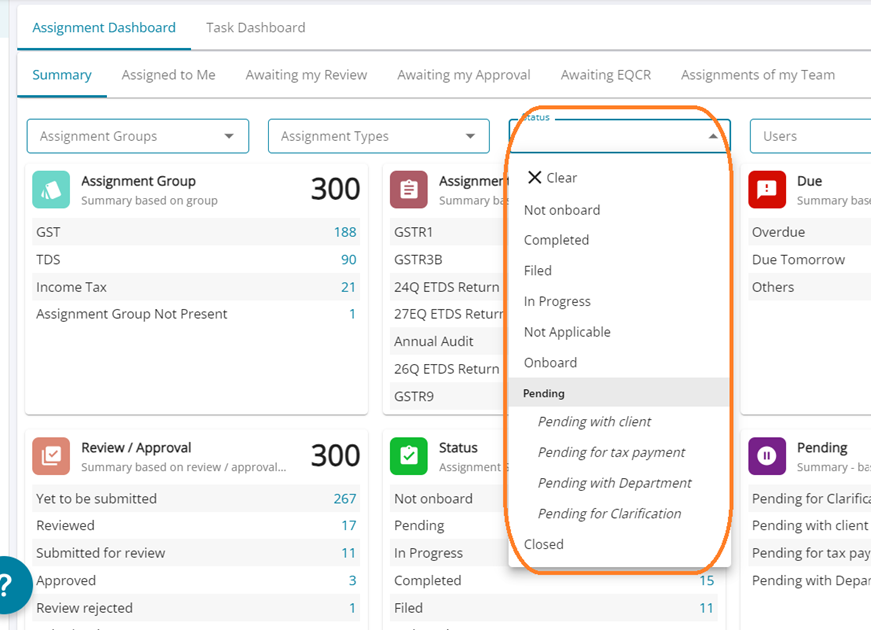
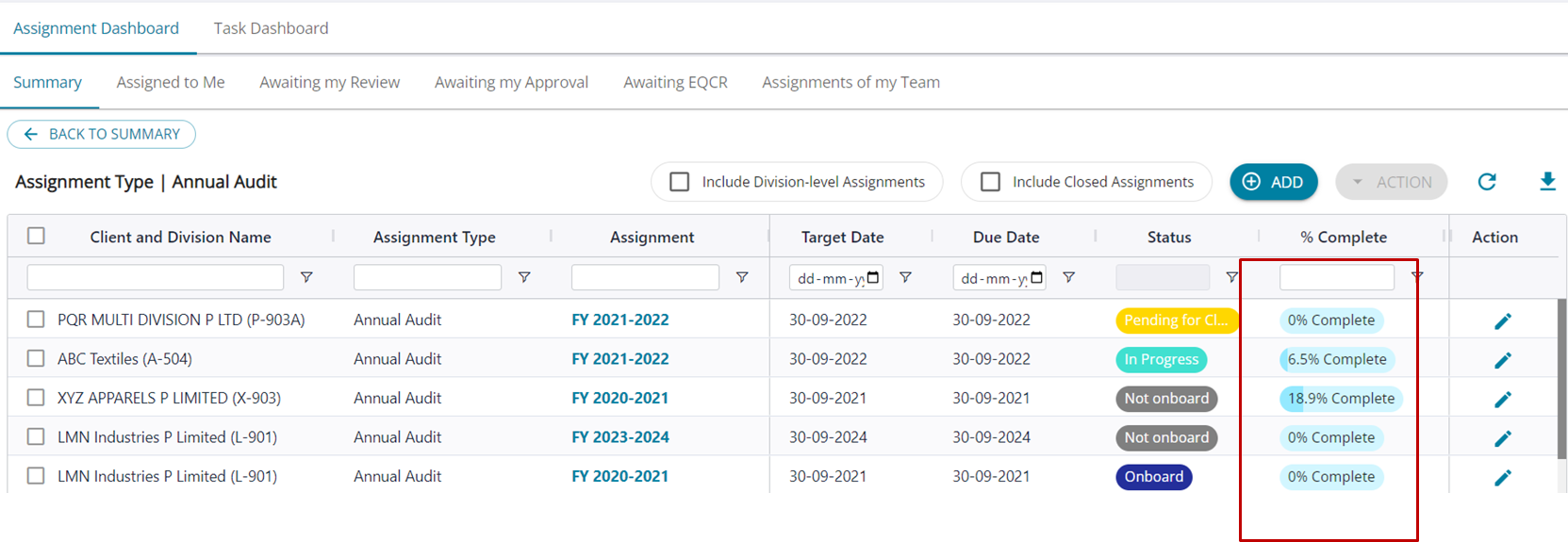
8. Status Filter on Assignment Dashboard: Just an additional feature to help you focus on the assignments that deserve your attention
9. % Complete: A new column to track the % complete for each assignment has been added
10. Deselect sections for Final Statement: The user can now deselect "Details" and "Cash Flow" sections while generating the Final Statement for both single-division as well as multi-division clients
Bug Fixes
Financial Statements
- Additional comments were not appearing in a statement where the amounts were rounded – Fixed
- Debtor / Creditor totals for the previous year were not appearing correctly for a specific scenario – Fixed
- Client address was not appearing in the final consolidated statement in a specific scenario – Fixed
- In Ledger Classification for Closing Stock mapping, if the Stock ledger had a closing credit balance, the ledger was not getting auto-mapped – Fixed
- Voucher Entry – In rare cases, an error was being thrown that the total debit and credit do not match, though the amounts were matching – Fixed.
************