
Audit Tasks - Execution Mode
Execution Mode
Makers, Checkers, Approvers, and EQCRs will have access to the execution screen.
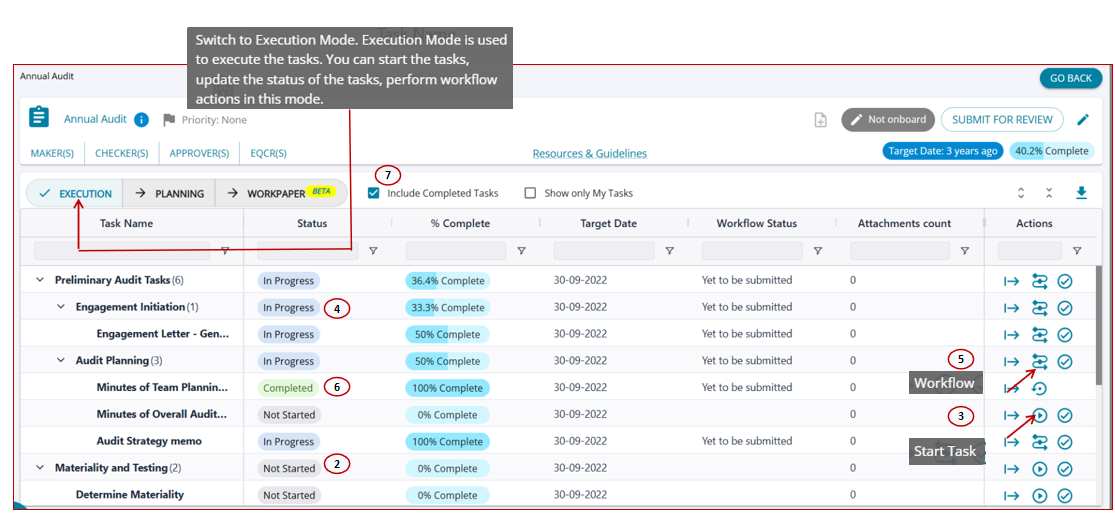
- The selected tasks in the “Planning View” are listed in the “Execution View” screen.
- By default, all tasks will be in the 'Not Started' status and '0% Complete'.
- Users can click on the 'Start Task' button for all tasks under the actions column to start the task.
- Once the task is started, the status changes to 'In Progress' for the task
- For tasks in the status In progress, the action column has the workflow button indicating that the task has now started.
- When the task is 100% complete (the maker completes the task) and is marked as complete, the task status changes to 'Completed'
- By selecting the "Include Completed Tasks" button, the screen filters and displays completed tasks only.
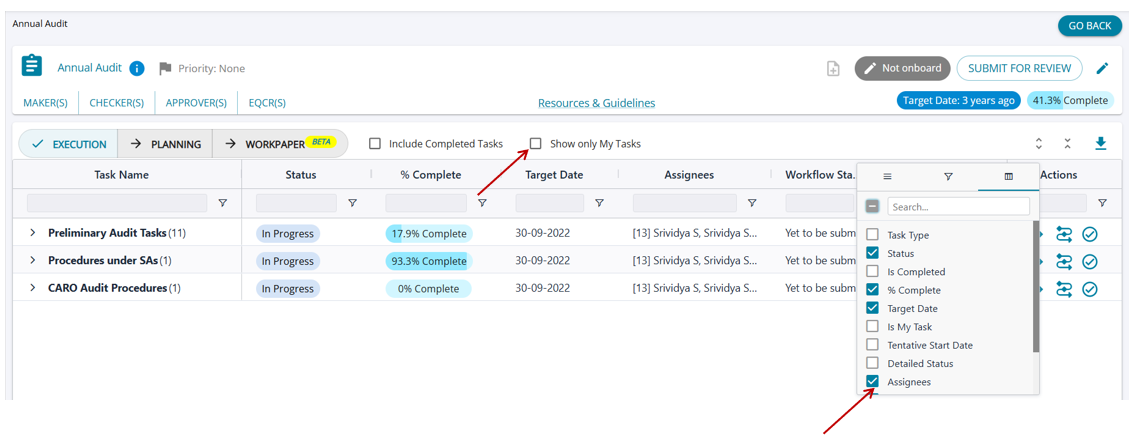
- If the "Show Only Tasks" checkbox is selected, then the tasks that are assigned to the user alone are listed.
- The assignees at the Maker, Checker, Approver, and EQCR level can be viewed for each task by adding the "Assignees" column.