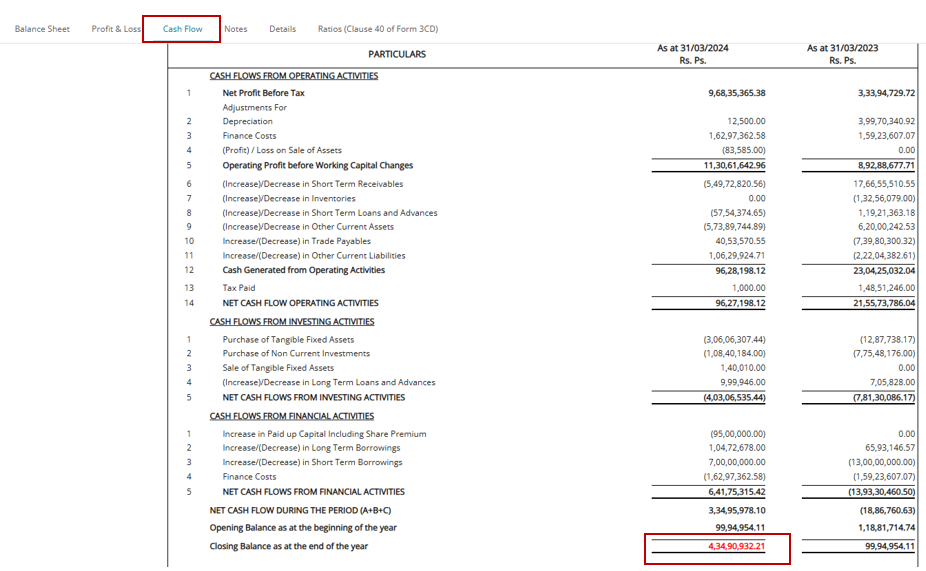
Cash Flow
Cash Flow Statements
1. In case where two or more years’ data is available in AssureAI, cash flow statements will be automatically prepared
2. Verify and check whether the Closing Cash and cash equivalents amount is matching with the figures in the balance Sheet
3. In case of mis-match, review the accuracy of entry in the following areas :
a)-Fixed Assets Additions / Deletions / Profit or Loss on Sale of Assets
b)-Tax Provision
c)-Prior Year Tax Payment
d)-Other Non Cash Items
4. In case of multiple changes made to the sub-head hierarchy, there is a chance that the cash flow may not tally (closing balance highlighted in red), even after all the above pre-requisites are fulfilled. If this happens, please contact the support team or raise a ticket so we can edit the cash flow formulae from the back end to match the updated sub-head hierarchy.
5. The back-end formula update of cash flow is a one-time activity which will reflect in all the clients’ statements.