
Notes Section
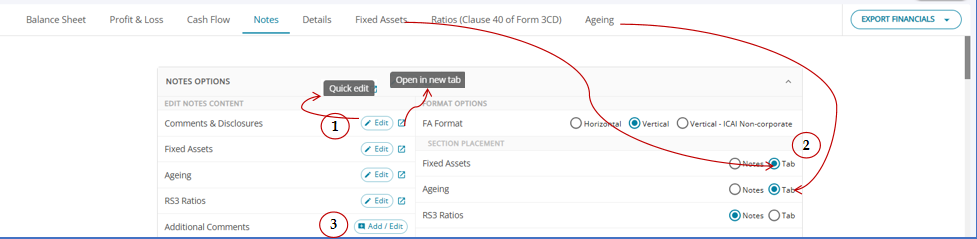
The Notes section provides users with multiple options to edit, configure, and manage notes and additional comments efficiently.
Quick Edit / Edit Notes
Under Edit Notes Content, users can select the Edit option available against each section, such as Comments & Disclosures, Fixed Assets, Ageing, or RS3 Ratios, to modify the relevant notes content.
Open Notes in a New Tab
The Open in New Tab icon available next to the Edit option allows users to open the selected notes section in a separate tab for easier viewing and editing.
Configure Fixed Asset Schedule Format
Under Format Options, users can select the preferred display format for the notes:
Horizontal
Vertical
Vertical – ICAI Non-corporate
Configure Section Placement
The Section Placement option allows users to choose whether the notes for specific sections, such as Fixed Assets, Ageing, and RS3 Ratios, should be displayed under the Notes section or as a separate Tab.
Add / Edit Additional Comments
The Additional Comments option allows users to Add or Edit comments at the required level. Users can click the Add / Edit button to open the relevant pop-up and enter or modify additional comments.
Quick Add/Delete at Head and Sub-head Levels
Additional comments can also be added or deleted directly at the Head or Sub-head level using the + callout icon available next to the respective name, enabling quick updates without navigating away from the current section.
https://assureai.productfruits.help/en/article/additional-comments