
Version History
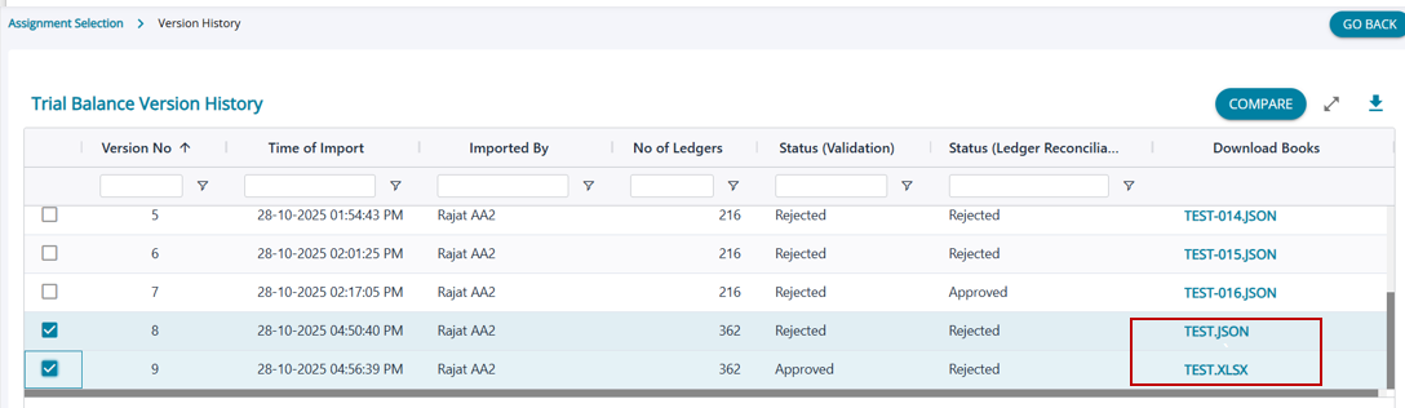
- Version History allows users to compare different versions of data imported into AssureAI.
- During the audit process, the books of accounts may undergo multiple revisions due to audit adjustments, corrective entries, and other updates made in the accounting system.
- As a result, users may need to update the books of account in AssureAI by re-importing the latest version.
- The Version History table maintains all imported versions of the data, along with a complete log including date and timestamp for each import.
- Users can select any two versions and click Compare to view the differences—showing the entries or changes made in the latest version compared to the previous one.
- The Download Books column allows users to download the books of accounts for each version in all supported formats: JSON, ZOHO, and Excel.
- Note: The JSON/Excel downloaded from this screen represents the originally imported data. It does not include any ledgers or vouchers that were added manually within AssureAI.
Once the Compare button is clicked, the system will display the results in three categories:
a) New Ledgers Added
b) Deleted Ledgers
c) Modified Ledgers- This acts as a proper audit trail for tracking all changes and entries passed in the books of accounts after they were submitted for audit.